
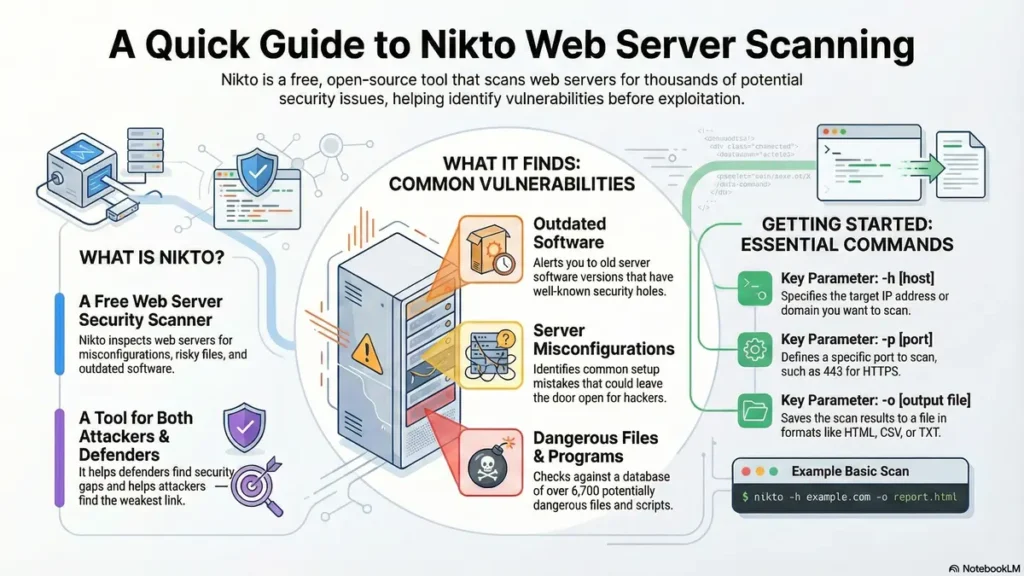
What is Nikto in cyber security is a fundamental question as web application security is more important than ever, with cyber threats continuing to grow in complexity.
Kali Linux, a widely used platform for penetration testing, comes equipped with a variety of tools designed to help safeguard web environments.
Among these, understanding what is Nikto in cyber security is crucial, as Nikto stands out as a highly effective web vulnerability scanner that can quickly detect potential risks and misconfigurations on servers.
By running Nikto commands within Kali Linux, security experts are able to perform thorough vulnerability scans and strengthen the defenses of their web applications.
This article explores the features of Nikto and provides a practical, step-by-step guide for using it to enhance your web security strategy, while also helping you understand what is Nikto in cyber security and how it can benefit your organization.
Key Takeaways
- Grasp why web security is essential in the digital era.
- Learn how Kali Linux supports web security testing.
- Get a clear overview of what is Nikto in cyber security and its strengths in vulnerability detection.
- Follow a practical guide to using Nikto commands for web server testing.
- Discover top tips for securing websites with Kali Linux.
Understanding what is Nikto in cyber security and Its Role in Web Security
Nikto is a freely available, open-source utility that scans web servers to identify security gaps and configuration mistakes.
By pinpointing vulnerabilities and setup issues, it provides cybersecurity professionals with a valuable tool to evaluate and enhance web server protection. To fully appreciate its value, it’s important to know **what is Nikto in cybersecurity** and how it fits into a comprehensive security strategy.
What is Nikto in cyber security and Why It Matters
Nikto thoroughly inspects web servers for various security issues, such as outdated software, misconfigurations, and unsafe plugins.
Detecting these problems early allows administrators to resolve them before they can be leveraged by malicious actors.
Making Nikto part of routine security checks helps reinforce the overall security of web applications.
Understanding what is Nikto in cybersecurity also involves knowing its ability to thoroughly inspect web servers
Nikto’s Capabilities in Vulnerability Assessment
- Detects obsolete software versions.
- Identifies misconfigured directories and files.
- Flags potentially dangerous plugins and modules.
With its comprehensive scanning, Nikto empowers security teams to thoroughly evaluate the health of web servers.
Why We Use Kali for Nikto?
Kali Linux is purpose-built for security testing and digital forensics.
Nikto integrates seamlessly with Kali, streamlining the process of performing vulnerability scans and making it easier for users to assess web server defenses.
Getting Started with Nikto Commands in Kali Linux
If you’re new to web security, Nikto commands in Kali Linux are an excellent starting point.
Nikto helps uncover server vulnerabilities and learning its command set will boost your ability to safeguard web applications.
Installing and Updating Nikto in Kali Linux
To install Nikto, open your terminal and run the following command:
sudo apt-get install niktoTo update Nikto, use these commands:
sudo apt-get updatesudo apt-get upgrade nikto
Regular updates ensure Nikto checks for the latest vulnerabilities, keeping your scans current.
Basic Syntax and Structure of Nikto Commands
For a basic scan, use:
nikto -h <target>(Replace `<target>` with the server’s hostname or IP address).
To save results, use the `-o` option:
nikto -h example.com -o output.txtTo choose an output format, use `-Format`:
-Format txtTo scan HTTPS, include `-ssl`:
nikto -h example.com -sslTo scan a non-default port, use `-port`:
nikto -h example.com -port 8080Essential Nikto Parameters for Beginners
-h: Specify the target host.-por-port: Define the target port.-Tuning: Adjust scan depth (e.g.,-Tuning xfor a more detailed scan, where 'x' represents a tuning option).-useragent: Set a custom User-Agent string to mimic specific browsers or tools.
Mastering these parameters makes Nikto a powerful tool for web security analysis.
Essential Nikto Commands for Effective Web Scanning
Nikto’s robust command set, especially when used in Kali Linux, enables detailed and flexible web vulnerability assessments.
Basic Target Scanning Commands
To scan a single target, use:
nikto -h 192.168.1.100To fine-tune for specific vulnerabilities, use the `-Tuning` option with relevant switches:
nikto -h 192.168.1.100 -Tuning 1To scan multiple hosts from a file, specify the file path:
nikto -h targets.txtAuthentication and Proxy Configuration
For basic authentication, include the username and password:
nikto -h example.com -id username:passwordYou can also use HTTP or SOCKS proxies for anonymous scanning:
nikto -h example.com -useproxy http://127.0.0.1:8080Output Formatting and Reporting
To save scan results to an HTML file, for instance:
nikto -h 192.168.1.100 -o output.htmlSupported output formats include HTML, CSV, and XML.
Tuning Scan Intensity and Coverage
You can change the scan level to make your checks faster or more detailed, depending on what you need.
This helps you save time or get a deeper look, based on your goals.
Advanced Nikto Techniques for Security Professionals
Evasion Techniques to Bypass Security Measures
Nikto can simulate various evasion tactics to test how well web applications resist attacks.
This includes encoding requests or modifying them to slip past firewalls and intrusion prevention systems.
For example, using the `-evasion` option with different evasion codes can help test defenses.
Plugin Management and Custom Scans
Nikto’s plugin system lets users enable or disable specific checks, focusing on certain vulnerabilities or improving scan performance.
Custom scans can be crafted to target particular areas of a website by specifying relevant plugins or directories.
Integrating Nikto with Other Security Tools
Nikto works well alongside tools like Nmap or Metasploit, providing a more comprehensive security assessment by combining different scanning methods.
For instance, Nmap can identify open ports, and then Nikto can scan web services found on those ports.
Real-World Security Testing Scenarios
Advanced users can leverage Nikto to mimic real-world attacks, probe for weaknesses, and validate the effectiveness of security controls.
This includes simulating common attack vectors like directory traversal or identifying sensitive files.
Conclusion
Kali Linux is an ideal environment for running Nikto because it is specifically built for penetration testing and comes with Nikto pre-installed.
This integration allows users to quickly launch Nikto, access its full range of features, and efficiently perform web vulnerability scans without the need for additional setup or configuration.
The compatibility and convenience provided by Kali Linux make it a top choice for security professionals using Nikto for web server assessments. If you want to truly understand **what is Nikto in cybersecurity**, using it within Kali Linux is the best way to experience its full capabilities.
Nikto is more than just a vulnerability scanner; it’s a cornerstone of proactive web defense.
By using Nikto on Kali Linux, you can better protect your web assets from emerging threats.
Now that you know how to use Nikto, start experimenting with its features, try advanced configurations, and stay informed about the latest in web security.
FAQ
General Questions about Nikto
1. Is Nikto difficult to use for beginners?
No, Nikto is command-line based but user-friendly. Even beginners can start scanning with simple commands, making it accessible for those new to **what is Nikto in cybersecurity**.
2. How do I update Nikto to the latest version?
You can update Nikto using the command
nikto -update3. Can Nikto be automated for regular scans?
Yes, you can schedule Nikto scans with scripts or cron jobs to keep your web servers regularly checked for vulnerabilities.
4. Does Nikto find all possible vulnerabilities?
No tool finds everything. Nikto is great for known issues, but it’s best used with other security tools for full coverage of potential weaknesses.
5. Can Nikto help with compliance requirements?
Nikto can assist with compliance by identifying web server vulnerabilities, but it should be part of a larger security program to meet all requirements.
6. Will running Nikto slow down my website?
Nikto sends many requests quickly, so it might temporarily increase server load, but it shouldn’t cause major slowdowns, especially on well-configured servers.
7. Can Nikto scan behind firewalls or login pages?
Nikto can use proxy settings and basic authentication, but it may not get past advanced firewalls or complex login systems without additional configuration or specialized tools.
8. Where can I learn more about using Nikto?
You can find guides and tutorials on the official Nikto website, GitHub page, or in cybersecurity forums and online courses to deepen your understanding of **what is Nikto in cybersecurity**.
9. Is Nikto only for Linux users?
While popular on Kali Linux, Nikto is a Perl script and can generally run on any system with Perl installed, including Windows and macOS.
10. Does Nikto perform active or passive scanning?
Nikto primarily performs active scanning by sending requests to the target server, though some checks might leverage publicly available information (passive).
11. What types of vulnerabilities does Nikto primarily detect?
Nikto primarily detects server misconfigurations, outdated software, common web server vulnerabilities, and issues with server headers and cookies.
12. Can Nikto be used for penetration testing?
Yes, Nikto is an essential tool in the reconnaissance and vulnerability assessment phases of penetration testing, providing initial insights into a web server's weaknesses.
13. How frequently should I run Nikto scans?
The frequency of Nikto scans depends on your organization's risk tolerance and change management. For critical applications, regular weekly or monthly scans are recommended.
14. Does Nikto require root privileges to run?
No, Nikto typically does not require root privileges to run. It operates by sending HTTP requests and analyzing responses, which can be done as a regular user.
15. What is the difference between Nikto and other vulnerability scanners?
Nikto focuses specifically on web server misconfigurations and known vulnerabilities, whereas other scanners might have broader capabilities covering networks, databases, or client-side issues.
16. Can Nikto detect custom web application vulnerabilities?
Nikto is less effective at detecting custom web application logic flaws unique to an application. It excels at common, known server-side vulnerabilities.
17. How can I reduce false positives when using Nikto?
To reduce false positives, carefully analyze Nikto's output, cross-reference findings with other tools, and manually verify reported vulnerabilities.
18. Is there a graphical user interface (GUI) for Nikto?
Nikto is primarily a command-line tool. There is no official GUI, though some third-party tools might integrate it.
19. Can Nikto scan multiple ports simultaneously?
Yes, you can specify multiple ports using the `-p` or `-port` option, separating them with commas (e.g., `-p 80,443,8080`).
20. How does Nikto handle redirects during a scan?
Nikto follows HTTP redirects by default, ensuring that it scans the final destination of a web application even if it moves.
- Kali Linux Download Guide
- How to Use Prebuilt Kali Linux VirtualBox Image
- Kali Linux on Raspberry Pi 4B: Default Password
- Install and Use Kali Linux on Raspberry Pi 4B
- Metasploit Framework in Kali Linux: Getting Started
- Metasploit Modules Explained
- Migrate Local WordPress Site to Live Hosting
- NOP Module in Metasploit: Use Case Explained
🔥 Free Ethical Hacking eBook on Kindle
Unlock your cybersecurity journey! Download a free ethical hacking eBook on Kindle and start learning the latest tools, techniques, and strategies used by professionals. Perfect for beginners and those looking to sharpen their hacking skills.
Get Your Free Kindle eBookFor more details, visit the official Nikto GitHub repository or check out the Kali Linux Nikto documentation.
Related Posts
 Cyber Security Jobs in 2026: Roles, Skills & Career Growth
Table of Contents Introduction Why Cyber Security Jobs Are in High Demand Top Cyber Security…
 Cyber Security Salary 2026:Expert Tips to Maximize Your Pay
Table of Contents Introduction What Is a Cyber Security Salary? Average Cyber Security Salary in…
 Entry Level Cyber Security Jobs thriving: Your Complete 2026 Guide to Launching a Career
Table of Contents Introduction Why Choose Entry Level Cyber Security Jobs? Top Entry Level Cyber…
 10 Powerful Operational Security Strategies to Protect Data
Operational Security (OPSEC) is more important than ever as cyber threats increase in frequency and…

