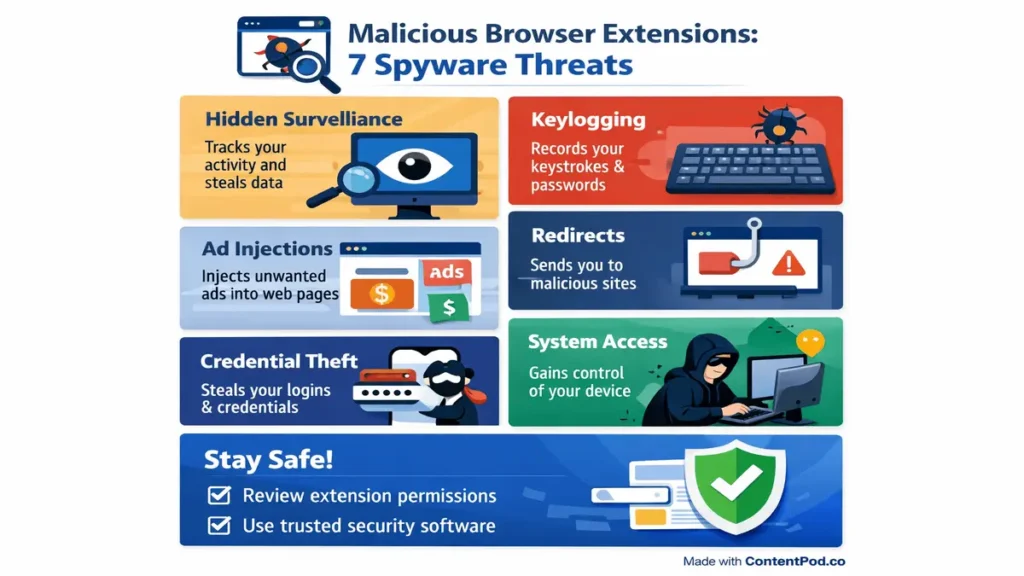
Browser extensions simplify web surfing, but malicious browser extensions can jeopardize your passwords, monitor your browsing history, and even infect your computer. Read this article to learn what malicious browser extensions are, how they are distributed, and how to defend against them. Great for anyone looking to secure their online experience.
What Are Malicious Browser Extensions?
Malicious browser extensions are seemingly ordinary add-ins for browsers like Google Chrome or Firefox that claim to have useful functionality, such as ad-blockers or video downloaders. However, these extensions can significantly harm your computer. Unlike viruses distributed via email, malicious browser extensions are available in official web stores of Chrome and Firefox. Initially, malicious extensions may be innocent; however, through their updates, they become capable of asking permission to read all browser tabs and cookies, as well as monitor visited web pages. Malicious capabilities of some browser extensions were hidden from the user for many months or even years because of using a “sleeper agent” tactic.
Any extension could be malicious when it is sold to cybercriminals or gets compromised through hacks. Even extensions with thousands of reviews and downloads can suddenly go malicious. The primary reason behind it all? Browser extensions have access to all your browsing activities, from logging in to your bank accounts to using social media websites.
The most common examples of malicious browser extensions are fake ad blockers, video downloaders, grammar checkers, and coupon finder extensions. They claim to make your life easy, but in reality, they steal your data.
How Do Malicious Browser Extensions Spread?
The distribution of malicious browser extensions occurs via trusted sources that obscure them. One of the most effective ways is the use of official Chrome Web Store and Edge Add-ons where the offenders distribute their products disguised as legitimate browser extensions. They create the illusion of legitimacy with proper coding and positive feedbacks, and after some time, introduce updates that transform them into malicious versions.
The other popular method includes the use of websites designed for downloading. When searching for “free YouTube downloader,” one encounters websites offering browser extensions, not programs. They utilize countdown timers and scareware tactics such as virus infections on your device. Moreover, phishing e-mails promise productivity tools or security updates that include malware.
In addition, cyber criminals purchase legitimate extensions from the vendors and release silent updates that introduce new features and convert the product into a spyware. This phenomenon occurred with numerous Chrome browser extensions that suddenly began collecting data from millions of devices.
Extension bundling also helps spread them around. Users of free software downloads often have these extensions included within the installation files. The installer asks users if they want to install useful extensions for Chrome through a pre-ticked box. This is overlooked by many people who end up installing malicious extensions.
Key Indicators
Quick detection of any malware can save your privacy online. The first indicator should be unnecessary permissions granted by an extension. An extension that allows you to change the appearance of your browser needs to request much fewer permissions than “all data on all websites,” for example.
Changes in your browser’s behavior indicate a potential problem with an extension. If you see that your start page became Yahoo or there are some extra toolbars in your browser and lots of sponsored websites popping up in search results, you should definitely check the extensions. Malicious applications usually use such methods to make their authors rich.
Unreliable developers are another way of determining if an extension may harm your privacy. Developers who really care about security will surely provide all information about themselves. You can always contact reliable extension developers and see all information regarding the extension itself. Fake extension developers do not even try to be legitimate, and their products can be easily distinguished from real ones.
Case Studies in the Real World
As seen in recent incidents, such malicious extensions pose increased risks. In 2025, research found “sleeper” Chrome extensions targeting 4.3 million victims. For several years, they remained dormant but became active to steal data, conduct surveillance, and deliver ads. Such extensions received positive user reviews, making them trustworthy.
Malicious ad blockers constitute yet another frequent example of dangerous browser extensions. Malware was disguised with names like “Adblock Pro for YouTube” and its derivatives. While the software pretended to block advertisements, it instead delivered more ads while stealing cookies from the Facebook and Gmail accounts of users.
Video downloaders often mask malicious browser extensions. “HD Video Downloader” with 3 million users directed victims to malware websites and monitored their keystrokes. Browser extensions for grammar correction and coupons finding frequently included malware harvesting data during online shopping sessions.
Password managers also pose significant risks to users. Vulnerable extensions compromised passwords across different browsers. Malicious Instagram extensions stole account credentials using clipboard data and other form submissions. Thus, malicious browser extensions impact both end-users and business customers alike.
Dangers
The aforementioned types of malicious software pose numerous dangers to users. Data breach is the foremost threat. The malware records any information typed on websites, including passwords, emails, and credit card details via cookies. Session hijacking occurs when an intruder gains access to accounts even without password knowledge.
Next come financial repercussions, where stolen bank credentials and shopping details cause fraudulent transactions. Malicious extensions also sell browsing history to marketers and criminals, revealing users’ hobbies, geographical location, and personal relations. Malware delivery occurs via extensions that allow background downloads of keyloggers or ransomware while navigating, redirects to bogus antivirus websites asking for payments, and phishing websites capturing other confidential credentials. Companies are the most vulnerable targets here, as one single infected employee jeopardizes their network and data security.
Privacy breaches occur when the malware logs all keystrokes, clicks, and visits made on webpages, developing a profile on each visitor. Unlike website trackers that users can stop blocking, these types of software cannot be blocked because they reside in extensions. Moreover, the history is stored permanently until removal.
How to Identify and Uninstall
Uninstalling malicious browser extensions is quite easy. Launch Chrome browser and click three-dot menu icon at the top right corner → More tools → Extensions (or type chrome://extensions/ in the address bar). Every extension features toggle switches to enable/disable and uninstall button.
Check permission granted. Delete extensions asking for “Read and change all your data on websites.” Pay attention to recent installation date because if you don’t remember installing it then it is highly suspicious. Check the high CPU consumption by a browser via its Task Manager.
Following uninstallation, restore browser settings to default. On Chrome browser go to Settings → Advanced → Reset and clean up → Restore settings to their original defaults. It will restore default homepage, search engine and pinned tabs hijacked by malicious software.
Check all browsers; the malware will be found in Chrome AND Firefox. Ensure that the stores have deleted all the malicious extensions. Check your financial records and change passwords on any significant accounts. Monthly checks on your extensions help to ensure that you don’t get reinfected.
Best Practices
Keep your computer safe from rogue extensions through best practices.
Install extensions only when necessary – fewer than 10 is optimal.
Install only well-tested extensions that have more than 100k installs, rate 4 stars or above and update frequently.
Make sure you can see a privacy policy on the websites of developers.
Examine permissions carefully at the time of installation. Any permission that does not relate to the functionality of the extension will not do. For example, ‘Grammar checker needs access to all tab data’ is not acceptable. In Chrome enable Enhanced Safe Browsing to block any dangerous extensions from being installed.
Monitor extensions regularly with help of browser task manager. Look for extensions which consume most resources on your computer and remove those which are not used since they make for a good channel for launching attacks. Use antivirus with ability to stop malicious downloads. This is particularly important in a corporate setting.
FAQ
1. Define a malicious browser extension.
An extension that pretends to be beneficial while stealing data.
2. How are malicious browser extensions distributed?
Malicious browser extension are distributed Via web stores, fake downloads, and compromised extensions.
3. Can Chrome Web Store host malicious browser extensions?
Indeed, they approve clean ones that get malware later.
4. How can you recognize malicious browser extensions?
Look through extensions permissions typing chrome://extensions/.
5. Can malicious browser extensions steal passwords?
Yes, through stealing cookies and form grabbing.
6. Are Firefox extensions more secure than Chrome ones?
There is slightly better approval process but still vulnerable.
7. Which permissions suggest danger?
“Read all websites” permission on simple extension.
8. How can I remove all browser extensions?
Go to chrome://extensions/ and click Remove for each extension.
9. Can an antivirus program detect malicious browser extensions?
Most of them can, run scan after removal.
10. Can a company prevent the usage of malicious browser extensions?
Yes, via creating policies that limit installs.
11. Explain a concept of a “sleeper” malicious browser extension.
It is a clean extension that becomes malicious through updates.
12. How frequently should I review my browser extensions?
You should review on monthly basis to prevent issues.
13. Does VPN protect against malicious browser extensions?
No, uninstall them before using any VPN service.
14. Are there fake ad-blocking software extensions?
Yes, very common – adds even more ads.
15. Can Edge be used for malicious extensions?
Yes, same problems as the Chrome browser store.
16. Where can you report malicious browser extensions?
You can report Via the browser extension store Report Abuse button.
17. Are browser extensions resistant to system resets?
No, a browser reset will erase all extensions.
18. What is the maximum number of extensions?
Having less than ten extensions is safest.
19. Does keeping browser extensions updated help?
No, updates will typically make it worse.
20. Can mobile web browsers have malicious extensions?
Yes, Android version of Chrome supports extensions.
🌟 Stay Connected with Coding Journey 🌟
Friends,
I’ve started Coding Journey to share tech knowledge, cybersecurity awareness, digital marketing tips, and practical tutorials to help everyone grow safely in the digital world.
If you find value in learning about:
✅ Linux & Cybersecurity
✅ Digital Marketing & SEO
✅ Online safety & scam awareness
✅ Practical tech guides
I’d really appreciate your support and follow 🙏
🔗 Official Website & Blog
🌐 https://codingjourney.co.in
📝 https://codingjourney1983.blogspot.com
🔗 Follow on Social Media
🔵 Facebook: https://www.facebook.com/people/Coding-journey/61585197473575/
💼 LinkedIn: https://www.linkedin.com/in/sunil-kumar-tiwari-07b8b466
🐦 X (Twitter): https://x.com/suniltiwari4509
📸 Instagram: https://www.instagram.com/coding9529/
📌 Pinterest: https://in.pinterest.com/codingjourney1983/
❓ Quora: https://www.quora.com/profile/Sunil-4966
✍️ Medium: https://medium.com/@codingjourney1983
Your one follow, like, or share really motivates me to create more helpful content 💙
Thank you for supporting Coding Journey 🙌
Let’s learn, grow, and stay secure together.
Related Posts
 How Can Malicious Code Do Damage:Website Security and SEO
How Can Malicious Code Do Damage:In the current digital world, the role of websites is…
 How Can You Prevent Viruses and Malicious Code: Cyber Security Guide (2026)
In the modern world of computers and the Internet, cyber attacks are rising at a…
 AI Powered Cybersecurity Threats: 7 Attacks Rising Fast
AI powered cybersecurity threats are growing silently and rapidly, affecting ordinary users, offices, and large…
 Top 5 Cybersecurity Threats Which Will Blow Your Mind
The leading 5 cybersecurity challenges are impacting all layers of society, from students sharing assignments…