
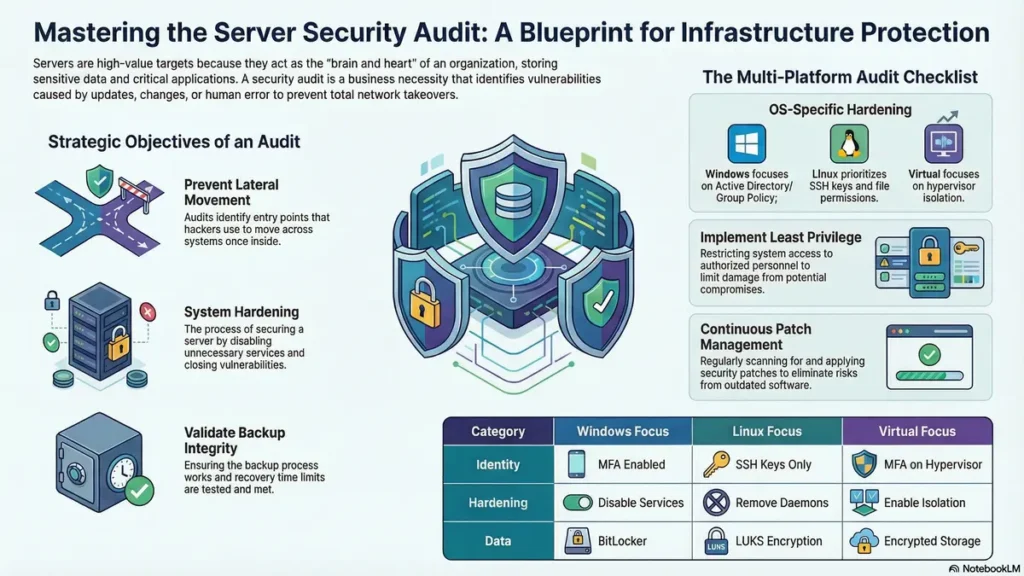
Servers are the brain and heart of any organization. They store sensitive customer data, business secrets, and critical applications. Because of their high computing power and large data storage, servers are prime targets for cybercriminals.
A single compromised server can lead to a complete network takeover, ransomware attack, or major data breach. That’s why a server security audit is not just an IT task—it is a business necessity.
Introduction
Why Servers are High-Value Targets
Unlike normal computers, servers are powerful and always accessible. Hackers target them because they provide entry into the entire network. Once compromised, attackers can move across systems to access sensitive data.
Importance of Regular Server Security Audits
A server security audit is a detailed review of a server’s configuration, performance, and security. It ensures that proper security controls are active and identifies weaknesses caused by updates, changes, or human error.
Objectives of a Server Security Audit
A server security audit ensures that your server is secure, reliable, and protected from online threats. The main objectives are as follows:
- Verify System Hardening
It checks to make sure the server is secure by disabling unnecessary services. - Identify Vulnerabilities
It checks for potential security threats, e.g., out-of-date software and unnecessary services. - Check Access Controls
It ensures that access to data and system resources is restricted to authorized personnel. - Validate Backups
It checks to make sure that the server can be backed up and that the backup process works. - Monitor System Logs
It checks system logs for suspicious activities or unauthorized access. - Ensure Patch Management
It checks to make sure that all security patches are up to date. - Assess Firewall Configuration
It checks to make sure that the server’s firewall configuration is correct. - Evaluate Network Security
It checks to make sure that the server’s network settings are secure enough to prevent outside and inside attacks. - Check Malware Protection
It checks to make sure that the server has adequate antivirus and anti-malware software. - Ensure Compliance
It checks to make sure that the server meets all security requirements.
Scope of Server Security Audit
A modern infrastructure audit includes:
Windows servers
Linux servers
Virtual servers
On-premises and cloud systems
Windows Server Security Audit
Ensure proper system configuration and hardening
Check active roles and services
Review Group Policy settings
Active Directory & Domain Controller Audit
Secure domain controllers
Remove inactive user accounts
Limit administrative privileges
Linux Server Security Audit
Check file permissions and ownership
Disable unnecessary services
Secure SSH configuration (no root login, use keys)
Virtual Server & Hypervisor Security Audit
Secure hypervisor access
Ensure proper VM isolation
Manage snapshots carefully
Patch Management & Vulnerability Audit
Keep systems updated
Perform vulnerability scanning
Avoid risks from outdated software
Privileged Access Management (PAM) Audit
Monitor admin access
Secure service accounts
Follow least privilege principle
Backup, Disaster Recovery & Business Continuity Audit
Maintain regular backups
Use encrypted storage
Test recovery time and data loss limits
Network & Firewall Configuration Audit
Configure strict firewall rules
Implement network segmentation
Logging, Monitoring & SIEM Audit
Track login attempts
Use centralized log monitoring systems
Common Security Issues Found
Too many admin users
Outdated operating systems
Weak or exposed backups
Tools Used for Server Security Audits
Native tools: Event Viewer, PowerShell, journalctl
Vulnerability scanners: Nessus, OpenVAS, Qualys
Log analysis: Splunk, ELK Stack, Graylog
Cybersecurity Audit Checklist
Category: Identity
Windows: MFA enabled
Linux: SSH keys only
Virtual: MFA on hypervisor
Category: Hardening
Windows: Disable unnecessary services
Linux: Remove unused daemons
Virtual: Enable isolation
Category: Data
Windows: BitLocker
Linux: LUKS encryption
Virtual: Encrypted storage
Category: Logging
Windows: Audit logs enabled
Linux: auditd active
Virtual: Logging enabled
Frequently Asked Questions (FAQ)
What is a server security audit
It is a review of server security settings and controls.
Why are servers important in cybersecurity?
They store valuable data and control operations.
What is included in a Windows audit?
System configuration, policies, and permissions.
How to audit Linux servers?
Check SSH, permissions, and services.
What is Active Directory audit?
Review of user accounts and permissions.
How often should audits be done?
Every 6–12 months or continuously for critical systems.
What tools are used?
Nessus, PowerShell, auditd, and others.
Does audit include backups?
Yes, backup and recovery are critical.
Are virtual servers different?
Yes, they include hypervisor security.
What is SIEM?
A system that centralizes and analyzes logs.
Server audit vs endpoint audit?
Server focuses on infrastructure; endpoint on user devices.
Why use SSH keys?
They are more secure than passwords.
What is PAM?
Management of admin-level access.
Can audits help compliance?
Yes, they support legal requirements.
What are stale accounts?
Inactive user accounts.
What is a hypervisor?
Software that runs virtual machines.
Why least privilege?
Limits damage if compromised.
What is immutable backup?
Backup that cannot be changed or deleted.
Why disable Print Spooler?
It has known security vulnerabilities.
What is lateral movement?
Attackers moving within a network after entry.
Conclusion
A server security audit is essential for protecting your organization. Servers store critical data, and any weakness can lead to major losses. By auditing Windows, Linux, and virtual systems, and focusing on backups and access control, you can build a strong and secure infrastructure.
🌟 Stay Connected with Coding Journey 🌟
Friends,
I’ve started Coding Journey to share tech knowledge, cybersecurity awareness, digital marketing tips, and practical tutorials to help everyone grow safely in the digital world.
If you find value in learning about:
✅ Linux & Cybersecurity
✅ Digital Marketing & SEO
✅ Online safety & scam awareness
✅ Practical tech guides
I’d really appreciate your support and follow 🙏
🔗 Official Website & Blog
🌐 https://codingjourney.co.in
📝 https://codingjourney1983.blogspot.com
🔗 Follow on Social Media
🔵 Facebook: https://www.facebook.com/people/Coding-journey/61585197473575/
💼 LinkedIn: https://www.linkedin.com/in/sunil-kumar-tiwari-07b8b466
🐦 X (Twitter): https://x.com/suniltiwari4509
📸 Instagram: https://www.instagram.com/coding9529/
📌 Pinterest: https://in.pinterest.com/codingjourney1983/
❓ Quora: https://www.quora.com/profile/Sunil-4966
✍️ Medium: https://medium.com/@codingjourney1983
Your one follow, like, or share really motivates me to create more helpful content 💙
Thank you for supporting Coding Journey 🙌
Let’s learn, grow, and stay secure together.
Related Posts
 How to Install WAMP Server on Windows 10/11 – Complete Beginner Tutorial
If you are interested in developing websites using PHP and MySQL, one of the best…
 Acunetix Download for Windows 10: Top 5 Must-Know Secrets
Table of Contents Introduction System RequirementscybeHow to Download Acunetix for Windows 10 Installation Steps Activation…
 5 Powerful Benefits of TLS Security to Protect Your Data
Table of Contents TLS security and Why Should You Care? The TLS Handshake: How Secure…
 Cyber Security Jobs in 2026: Roles, Skills & Career Growth
Table of Contents Introduction Why Cyber Security Jobs Are in High Demand Top Cyber Security…

