
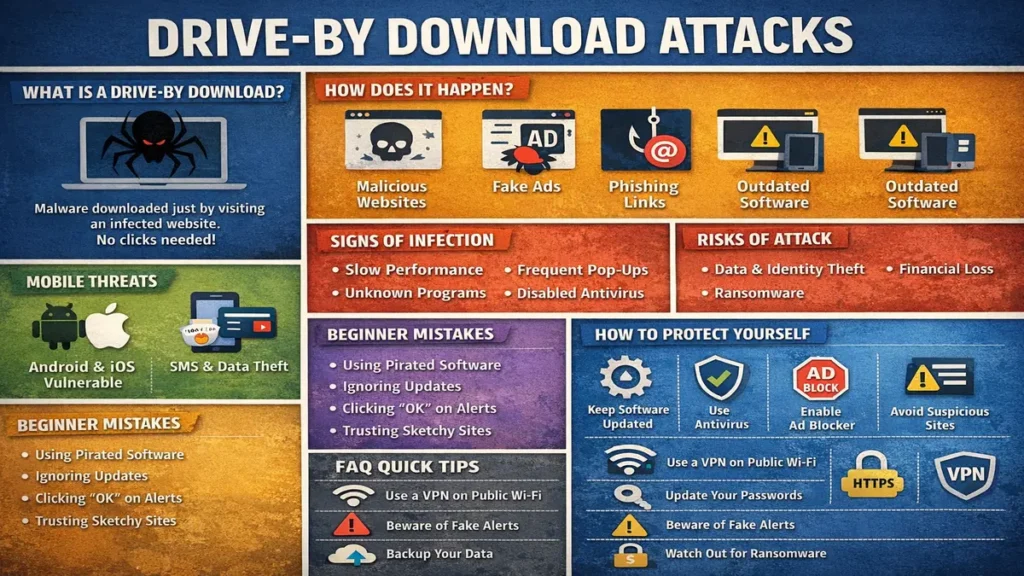
Have you ever visited a website and noticed your computer suddenly becoming slow, showing strange pop‑ups, or redirecting you to unknown pages—without downloading anything? If yes, you may have experienced a drive by download attack. This type of cyberattack is dangerous because it happens silently, without the user’s knowledge or permission.
Drive-by download attacks are increasing rapidly and now target beginners, students, office workers, and everyday internet users. Hackers hide malicious code inside normal‑looking websites or advertisements, waiting for someone to visit. In this article, you will learn what a drive-by download attack is, how it works, real examples, and simple ways to stay safe—explained in easy language.
Table of Contents
- What Is a Drive-By Download Attack?
- Why It Is Called a Drive-By Download
- How a Drive-By Download Attack Works
- Types of Drive-By Download Attacks
- Real‑Life Examples of Drive-By Download Attacks
- Difference Between Drive By Download and Normal Malware
- Common Sources of Drive By Download Attacks
- Malicious Websites and Malvertising
- Browser and Software Vulnerabilities
- What Happens After Infection
- Signs Your System May Be Infected
- Why Beginners Are Easy Targets
- Drive By Download Attacks on Mobile Devices
- Cybersecurity Impact
- How to Prevent Drive By Download Attacks
- What to Do If You Are a Victim
- Safe Browsing Best Practices
- Conclusion
- FAQs: Drive By Download Attack
What Is a Drive By Download Attack?
A drive by download attack is a cyberattack in which malware is automatically downloaded and installed on your device when you visit a malicious or compromised website. You do not need to click on any link, download a file, or give permission.
The attack uses security weaknesses in your browser, operating system, or software to infect your system silently. For example, if your browser has an unpatched bug, a hacker can use that bug to run code on your PC just by you opening a webpage.
Drive by download attacks are especially dangerous because:
- You don’t see any warning or download dialog.
- The website looks completely normal (no scary pop‑ups or red warnings).
- It can happen in seconds, even on websites you trust.
Why It Is Called a Drive By Download
The term “drive by” means something that happens while just passing by. In this attack, simply visiting a webpage is enough. Just like driving past a location without stopping, malware enters your system without any action from you.
Think of it like this: you’re walking past a shop, and someone throws a small package into your bag without you noticing. That’s exactly how a drive by download works—malware “drops in” while you’re just browsing.
How a Drive By Download Attack Works
Here is how a drive by download attack usually happens:
- A hacker injects malicious code into a website or advertisement.
- The website looks normal to visitors (no visible signs of hacking).
- You visit the website using your browser.
- The browser or plugin has a security vulnerability (like an old Flash or Java plugin).
- Malware downloads automatically in the background.
- Your system becomes infected, and the hacker can now steal data, spy on you, or lock your files.
The whole process can take just a few seconds. You open a page, and before you even read the content, malware is already on your device.
Types of Drive By Download Attacks
Exploit‑Based Drive By Downloads
These attacks exploit vulnerabilities in browsers or outdated software such as PDF readers, Java, or media players. The hacker uses an “exploit kit” that automatically scans your system for weak spots and then runs malicious code if it finds one.
Social Engineering‑Based Drive By Downloads
These attacks use fake warnings, fake updates, or fake pop‑ups to trick users into allowing downloads. For example:
- “Your Flash Player is outdated! Click here to update.”
- “Virus detected! Download our antivirus now.”
- “Your browser needs a new plugin to view this page.”
If you click “OK” or “Download,” you’re actually installing malware instead of a real update.
Real‑Life Examples of Drive By Download Attacks
Here are some real‑world examples of drive by download attacks:
- Free movie or streaming websites: Many free movie sites are full of malicious ads. Just visiting the site can trigger a drive by download.
- Hacked news or blog websites: Even popular news sites can be hacked. Attackers inject malicious code into the page, and visitors get infected.
- Infected online ads (malvertising): Legitimate websites run ads from third‑party networks. Hackers buy ad space and show malicious ads that download malware when the page loads.
- Pirated software websites: Sites offering cracked software or keygens often bundle malware. Even if you don’t click “download,” the page itself can start a drive by download.
Difference Between Drive By Download and Normal Malware
| Drive By Download | Normal Malware |
|---|---|
| No user interaction required (just visiting a site is enough) | User must click a link, open an attachment, or run a file |
| Silent infection (no visible download) | User often sees a download or installation dialog |
| Uses vulnerabilities in browser/OS/software | Uses fake files, emails, or social engineering tricks |
Common Sources of Drive By Download Attacks
Drive by download attacks come from many places. The most common sources are:
- Compromised websites: Any website (even big, trusted ones) can be hacked and used to spread malware.
- Malicious advertisements: Ads on news sites, blogs, and social media can contain hidden malware.
- Pirated content platforms: Sites offering free movies, games, or software are high‑risk.
- Adult or gambling websites: These sites often have many ads and are frequently targeted by hackers.
Malicious Websites and Malvertising
Malvertising is malicious advertising where hackers inject harmful code into online ads. You do not need to click the ad—just loading the ad can infect your system.
How malvertising works:
- Hacker buys ad space on a popular website.
- The ad contains hidden code that checks your browser and plugins.
- If it finds a vulnerability, it automatically downloads malware.
- Your device gets infected, even though the website itself is legitimate.
Browser and Software Vulnerabilities
Drive by download attacks mainly succeed because of outdated software. Old browsers and unpatched operating systems contain security holes that hackers exploit.
Common vulnerable software:
- Old versions of web browsers (Chrome, Firefox, Edge, etc.)
- Outdated plugins like Adobe Flash, Java, or Silverlight
- Old PDF readers, media players, and office suites
- Unpatched operating systems (Windows, macOS, Linux)
Hackers use “exploit kits” that automatically scan your system for these weaknesses and then run malware if they find one.
What Happens After Infection
Once infected, malware can:
- Steal passwords and personal data (banking details, email, social media).
- Install ransomware that locks your files and demands money.
- Spy on your activities (keylogging, screen recording, webcam access).
- Slow down your system and show constant pop‑ups.
- Turn your device into a bot that attacks other computers.
In some cases, the malware can spread to other devices on your network, infecting phones, tablets, and even smart TVs.
Signs Your System May Be Infected
If you notice any of these signs, your device might be infected:
- System becomes very slow or keeps freezing.
- Unknown programs appear in your Start menu or Applications folder.
- Browser redirects to strange websites or search engines.
- Frequent pop‑ups, even when no browser is open.
- Antivirus or firewall suddenly stops working or gets disabled.
- Unusual network activity (high data usage when idle).
Why Beginners Are Easy Targets
Beginners are often easy targets because:
- They ignore software updates and keep using old, vulnerable versions.
- They download software from unofficial or pirated sources.
- They don’t understand security warnings and click “OK” without thinking.
- They trust every website and ad they see online.
Attackers know this and design drive by download attacks to look like normal updates, videos, or downloads to trick beginners.
Drive By Download Attacks on Mobile Devices
Mobile devices can also be affected, especially Android phones. Fake apps, infected websites, and malicious ads are common sources.
How it happens on mobile:
- Visiting a malicious website in the browser.
- Clicking on a malicious ad that starts a download.
- Installing fake apps from third‑party app stores.
- Opening a phishing link that redirects to a drive by download page.
On Android, malware can steal SMS messages, banking apps data, and even record calls. On iOS, drive by downloads are rarer but still possible through Safari vulnerabilities.
Cybersecurity Impact
A single drive by download attack can lead to:
- Data breaches: Personal photos, documents, and messages can be stolen.
- Financial loss: Bank accounts, UPI, and credit cards can be drained.
- Identity theft: Hackers can open loans or credit cards in your name.
- Network compromise: In offices, one infected PC can spread malware to the entire network.
- Reputation damage: If your email or social media is hacked, fake messages can be sent to your contacts.
For businesses, a drive by download can result in downtime, legal penalties, and loss of customer trust.
How to Prevent Drive By Download Attacks
To protect yourself from drive by download attacks:
- Keep your browser and operating system updated.
- Use a trusted antivirus and keep it updated.
- Avoid suspicious websites (pirated content, adult sites, unknown blogs).
- Disable unnecessary plugins (Flash, Java, Silverlight).
- Use an ad‑blocker to stop malicious ads.
- Use a standard user account (not admin) for daily browsing.
- Enable pop‑up blockers in your browser.
- Only download software from official websites.
- Be careful with fake security warnings and fake updates.
What to Do If You Are a Victim
If you suspect a drive by download attack:
- Disconnect from the internet (Wi‑Fi or mobile data).
- Run a full antivirus scan in safe mode.
- Change passwords for important accounts (email, banking, social media).
- Update all software (browser, OS, apps).
- Consider reinstalling the operating system if the infection is severe.
Safe Browsing Best Practices
Always:
- Download software only from official sources.
- Avoid pirated content and cracked software.
- Enable automatic updates for your OS and browser.
- Use HTTPS websites (look for the padlock icon).
- Think before clicking on links or ads, even on trusted sites.
Conclusion
A drive by download attack is silent, dangerous, and easy to fall for—especially for beginners. Awareness and safe browsing habits are your best defense. Staying updated and alert can protect you from serious cyber threats.
FAQs: Drive By Download Attack
- What is a drive by download attack? – A silent malware attack triggered by visiting a website.
Malware downloads automatically without any click or permission. - Do I need to click anything? – No, just visiting the page is enough.
The attack works even if you do not click any link or ad. - Are these attacks common? – Yes, they are very common now.
Hackers use them daily on normal websites and ads. - Can trusted websites be infected? – Yes, even big sites can be hacked.
Attackers inject malware into news, blogs, and shopping sites. - Can antivirus stop it? – It helps if updated and real‑time protection is on.
Old or disabled antivirus may not catch the attack. - Are mobile phones vulnerable? – Yes, especially Android devices.
Visiting bad sites or clicking ads can infect your phone. - What is malvertising? – Malware spread through online ads.
You can get infected just by loading the ad, not clicking it. - Can ransomware spread this way? – Yes, many ransomware attacks start with a drive by download.
Once infected, your files can be locked and held for ransom. - Do updates matter? – Absolutely, updates fix security holes.
Old browsers and software are easy targets for hackers. - Can passwords be stolen? – Yes, keyloggers and spyware can steal them.
Always change passwords after a suspected infection. - Are pop‑ups dangerous? – Many are, especially fake security warnings.
Never click “Download” or “Update” in suspicious pop‑ups. - Is public Wi‑Fi risky? – Yes, it increases exposure to attacks.
Use a VPN and avoid sensitive tasks on public networks. - Can reinstalling OS help? – Yes, it removes most malware.
Back up important data first and scan it before restoring. - Is Chrome safe? – Yes, if updated and used carefully.
But even Chrome can be exploited if plugins are outdated. - Are beginners targeted more? – Yes, because they often ignore updates.
Attackers design fake updates and warnings to trick new users. - Do businesses face risk? – Very high, one infected PC can spread malware.
Drive by downloads can lead to data breaches and financial loss. - How fast does infection happen? – Seconds, as soon as the page loads.
You may not notice anything until the system slows down. - Can firewall help? – Partially, it blocks some connections.
But it cannot stop malware from downloading if the browser is vulnerable. - Is pirated software risky? – Extremely, it often contains hidden malware.
Always download software from official websites only. - How can I stay safe? – Update, verify, and browse wisely.
Use antivirus, ad‑blocker, and avoid suspicious sites and ads.
Stay Connected with My Coding Journey
Don’t let scammers stop your professional growth. Join our community for more tech safety tips!
For more tutorials and guides, check out: CodingJourney.co.in
Related Posts
 SecurityTrails Explained: Powerful OSINT Tool 2026
In today’s digital world, knowing what is available on the internet is one of the…
 10 Effective Metasploit Modules Explained
Introduction to Metasploit Modules What is a Metasploit Module? Types of Metasploit Modules Exploit Modules…
 Dhurandhar Movie Download -Safe or Scam Using Google Dorks (2026)
Are you looking for dhurandhar movie download, dhurandhar full movie, or trying various tricks like…
 What is Information Security Powerful Guide for 2026
What is Information Security & How to Master it Today 🚨 Live Example: Google Drive…

