
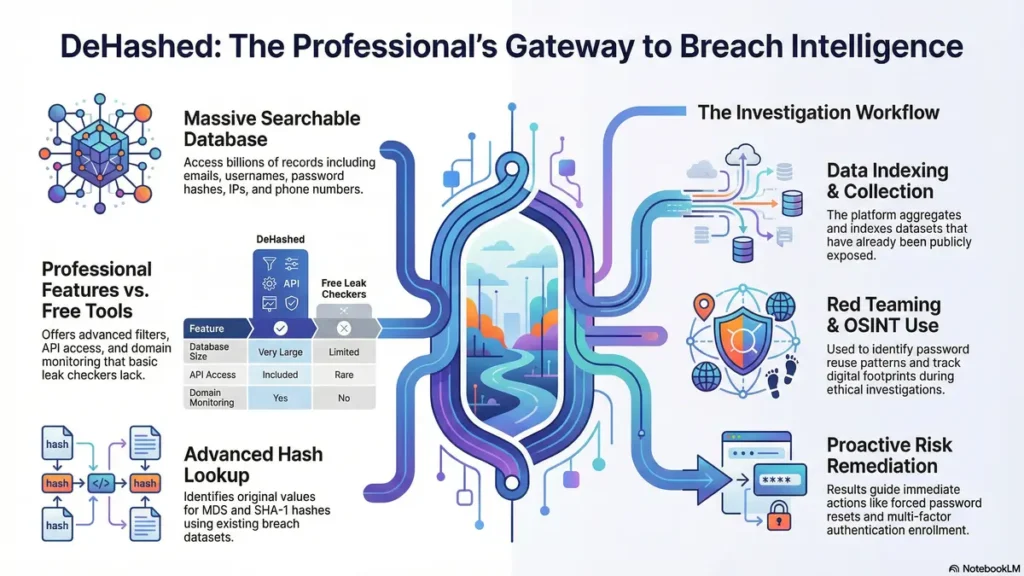
In the field of cybersecurity, data leaks, and digital investigations, DeHashed is a powerful and widely recognized platform. If you are an ethical hacker, OSINT researcher, cybersecurity analyst, or digital forensics expert, understanding this breach intelligence plateform can give you a serious professional advantage.
This article covers Following points:
What is DeHashed?
How this breach intelligence platform works
Key features
Why it is important for cybersecurity
Is this breach intelligence service legal?
How to use this intelligence search engine service step-by-step
Top 10 breach intelligence services
Let’s explore everything in detail.
What is DeHashed?
It is a professional breach intelligence and email search service designed for cybersecurity professionals and researchers. The intelligence service platform allows users to search billions of records collected from publicly exposed data breaches.
In simple terms, It is used to search for:
Compromised email addresses
Leaked usernames
Exposed password hashes
IP addresses
Domains
Phone numbers
It is commonly used in penetration testing, red teaming, threat intelligence, and OSINT investigations.
How Does this breach intelligence platform Work?
It gathers and indexes data from publicly disclosed data breaches. Importantly, It does not hack accounts. It only indexes data that has already been exposed.
Here is how it works:
A data breach occurs.
The breached data becomes publicly accessible.
This intelligence platform collects and indexes the leaked dataset.
Users search using email, username, domain, IP, or hash.
It displays where and how the data was exposed.
For example, if you search an email address on this breach intelligence service plateform , you may see:
The breached website
Date of breach
Associated usernames
Hashed password
This makes it extremely valuable for identifying digital exposure risks.
Why DeHashed Is Important for Cybersecurity
1. Red Team & Penetration Testing
During penetration testing, professionals simulate real-world attacks. It helps identify:
Exposed employee credentials
Password reuse patterns
Leaked internal emails
This intelligence platform allows security teams to assess real risk levels based on actual breach exposure.
2. Threat Intelligence
Security analysts use this data leak investigation platform to:
Investigate targeted attacks
Check whether attacker emails were exposed in previous breaches
Track digital footprints
It strengthens threat intelligence operations by providing historical breach insights.
3. OSINT Investigations
It plays a major role in OSINT investigations. Public breach data can reveal:
Alias connections
Old usernames
Linked domains
For cybercrime investigation and background analysis, This data leak intelligence platform is a powerful research tool.
Key Features
1. Massive Breach Database
It indexes billions of records from various breaches. This makes it one of the largest searchable breach intelligence platforms available.
2. Advanced Search Filters
It allows searches by:
Email
Domain
IP address
Username
Phone number
Hash values
It supports advanced filters such as:
Specific breach filtering
Date range filtering
Domain-based filtering
3. API Access
It provides API access for developers and security teams. The API can be integrated into:
Security dashboards
SIEM systems
Automated monitoring tools
If you are building cybersecurity AI systems or threat detection platforms, integrating the API can significantly enhance breach intelligence capabilities.
4. Hash Lookup
Security researchers frequently need to check hash values. It supports hash lookup to determine whether a specific MD5 or SHA-1 hash exists in known breach datasets.
5. Domain Monitoring
Organizations can use this intelligence platform to monitor corporate domains and detect whether employee emails appear in data breaches.
Is It Legal?
This is one of the most common questions about.
It does not hack systems. It only indexes data that has already been publicly exposed.
However:
Using leaked data for illegal activities is illegal.
Attempting unauthorized access using exposed credentials is illegal.
Using this intelligence tool for ethical security auditing is legal in most jurisdictions.
Always use this advance breach intelligence tool for:
Cybersecurity research
Protecting organizations
Security auditing
Never use this tool for:
Harassment
Stalking
Unauthorized system access
Responsible use of this intelligence tool is essential.
How to Use this breach intelligence platform (Step-by-Step)
Step 1: Create a Account
Visit the official DeHashed website and register.
Step 2: Choose a Plan
It offers limited free searches and paid plans for full access.
Step 3: Perform a Search
Enter:
Email
Domain
Username
Hash
Step 4: Analyze Results
Review:
Source of breach
Date of exposure
Associated credentials
Step 5: Take Action
If this intelligence platfom reveals exposure:
Change passwords immediately
Enable multi-factor authentication
Inform affected users
Conduct internal security audits
DeHashed vs Free Breach Checkers
| Feature | DeHashed | Free Leak Checkers |
|---|---|---|
| Database Size | Very Large | Limited |
| Advanced Filters | Yes | No |
| API Access | Yes | Rare |
| Domain Monitoring | Yes | No |
| Professional Use | Yes | Basic Only |
DeHashed is designed for professionals, while free tools are suitable for basic personal checks.
Top 10 Breach Intelligence Services
1. DeHashed
DeHashed is a professional breach intelligence platform that helps users search billions of records obtained from publicly exposed data breaches. The platform provides users with the ability to query information using email addresses, domains, usernames, IP addresses, and hash values. This platform is predominantly used by security professionals, penetration testers, and OSINT practitioners for analyzing breached credentials and online footprints. Additionally, DeHashed provides users with API access to integrate breach intelligence into SIEM systems. This platform provides users with powerful filtering options and domain monitoring tools to help organizations proactively improve their security posture.
2. Have I Been Pwned
Have I Been Pwned (HIBP) is a well-known breach notification service with international recognition. It is a breach notification service with the aim of helping users check whether their email address or password has been compromised in a breach. It has a user-friendly interface, which makes it easier for users who are not technically inclined to use the service. HIBP is focused on creating awareness among users about the importance of passwords. It is the first service that users turn to when they want to check if they have been a victim of a security breach.
3. Intelligence X
Intelligence X is a powerful search engine and data archiving tool. It can be utilized as a tool for investigation and OSINT research. Intelligence X archives data from leaks, paste websites, and documents. It also archives data from the dark web. Users can search for emails, domains, cryptocurrency addresses, and keywords. Intelligence X can be very useful to journalists and security researchers who need powerful research capabilities. Intelligence X can also be utilized as a breach data search engine and intelligence gathering tool.
4. Snusbase
Snusbase is a search engine that offers the facility to search for leaked data from previous data breaches. It offers the facility to search for leaked emails, usernames, IP addresses, and passwords. Snusbase is generally used for conducting OSINT research and for tracing digital footprints. It primarily operates on the subscription model. Snusbase offers results that can be easily organized, making it the preferred choice for researchers who require a simple breach lookup tool.
5. LeakCheck
LeakCheck is a data breach search and monitoring service that assists users in finding out if their data is leaked in public breaches. It provides email, domain, and phone number search, as well as an API that can be used for automation purposes. The service is aimed at helping individuals and organizations that want to monitor their exposure risks. The service is simple to use, making it convenient for security monitoring purposes. Organizations use it to find leaked employees’ accounts, thereby reducing the threat of credential-based attacks.
6. SpyCloud
SpyCloud is a company focused on the delivery of an identity threat protection solution for the enterprise market. It uses breach intelligence to prevent account takeover and fraud. SpyCloud gathers breach data from illicit marketplaces and exposed databases. It then uses the data to identify the compromised credentials. SpyCloud assists organizations in the remediation of risks through the forcing of password resets and the improvement of authentication systems. SpyCloud is normally utilized by large enterprises, financial organizations, and government agencies to protect customers and employees from identity threats.
7. ZeroFox
ZeroFox is an external cybersecurity solution focused on digital risk protection. It monitors social media, the dark web, and open sources for threats targeting brands and individuals. ZeroFox is a cybersecurity solution that offers breach intelligence along with brand protection and threat detection. It is used by companies to prevent phishing attacks, credential stuffing, and impersonation attacks. Its intelligent solution allows companies to detect and mitigate threats before they occur. ZeroFox is a widely used solution by companies looking to protect their online presence.
8. Constella Intelligence
Constella Intelligence is a risk intelligence provider that deals with identity exposure and fraud prevention. It offers a range of information through the aggregation of breach data, criminal forum data, and open-source information. Constella Intelligence assists organizations in the monitoring of employee and executive exposure, which helps prevent targeted attacks. It is also very useful for organizations that are concerned about identity exposure and reputation. It offers intelligence solutions that help organizations protect themselves from security risks and threats.
9. Breach Directory
Breach Directory is a breach search tool that offers users the facility to search for leaked emails or domains. It offers results that can be easily interpreted for users. It is generally used for conducting exposure tests. Although not as advanced as some of the other breach search tools, Breach Directory offers some good breach lookup features. It can be regarded as a simple tool for conducting breach tests.
10. Hudson Rock
Hudson Rock is a cybercrime intelligence company specializing in monitoring compromised machines and infostealer malware activity. It collects intelligence from infected systems and exposed credentials to help organizations detect and mitigate risks. Hudson Rock provides visibility into compromised employee accounts and corporate exposure. Law enforcement agencies and enterprise security teams use its intelligence to track cybercriminal operations and prevent further exploitation. Its focus on infostealer data makes it unique among breach intelligence providers.
Final Thoughts on DeHashed
DeHashed is a powerful breach intelligence platform that helps cybersecurity professionals identify data exposure risks quickly and efficiently. Whether you are an ethical hacker, red teamer, OSINT investigator, or IT consultant, mastering DeHashed can significantly improve your cybersecurity capabilities.
If you are building security dashboards, AI monitoring tools, or threat intelligence systems, integrating DeHashed data can strengthen your overall security posture.
In today’s digital world, awareness equals protection.
And DeHashed helps you stay one step ahead of cyber threats.FAQ
1. What is DeHashed?
It is a professional breach intelligence and data breach search platform that allows users to search billions of exposed records from public data leaks. It is widely used by cybersecurity professionals, OSINT researchers, and penetration testers.
2. Is DeHash different from DeHashed?
No. It is commonly used as a short form. Both keywords refer to the same breach intelligence and email search service.
3. What is DeHashed email search service?
The email search service allows users to check whether an email address appears in publicly exposed breach databases. It helps identify compromised accounts, associated usernames, and leaked credentials.
4. How does DeHashed email search work?
The email search feature works by scanning indexed breach records. When you enter an email address, It searches its database and shows matching results from known data breaches.
5. What is an MD5 dehasher?
An MD5 dehasher is a tool used to check whether an MD5 hash exists in previously leaked breach datasets. Instead of cracking the hash directly, It compares the hash against known exposed records.
6. How does SHA-1 work?
The SHA-1 feature allows users to check whether a SHA-1 hashed value appears in indexed breach databases. It performs a database match rather than brute-force cracking.
7. Where can I find API documentation?
The API documentation is available to users who subscribe to paid plans. It provides technical details for integrating breach search capabilities into security dashboards, SIEM tools, and monitoring systems.
8. What is breach search?
breach search allows users to search for specific breach names, domains, or email addresses to determine whether they were involved in a data leak.
9. What is breach search service?
The breach search service is designed for professional use. It provides advanced filtering, bulk search options, and detailed breach intelligence for cybersecurity teams.
10. How does data breach search help organizations?
The data breach search feature helps organizations monitor employee emails, detect credential exposure, and reduce risks like credential stuffing attacks.
11. Does support phone number search?
Yes. DeHashed phone number search allows users to check whether a phone number appears in public breach datasets, depending on the indexed records.
12. What is a Dehasher?
A dehasher is a general term for a tool or service that identifies the original value of a hash by comparing it against known databases. In the case of DeHashed, it performs hash matching using exposed breach data.
13. How to use Dehahed check email feature?
The check email feature allows you to enter an email address and view related breach records. It is useful for personal exposure checks and corporate security audits.
14. Is DeHashed free?
free access is limited. While some basic searches may be available, full record visibility, API access, and advanced filtering require a paid subscription.
🌟 Stay Connected with Coding Journey 🌟
Friends,
I’ve started Coding Journey to share tech knowledge, cybersecurity awareness, digital marketing tips, and practical tutorials to help everyone grow safely in the digital world.
If you find value in learning about:
✅ Linux & Cybersecurity
✅ Digital Marketing & SEO
✅ Online safety & scam awareness
✅ Practical tech guides
I’d really appreciate your support and follow 🙏
🔗 Official Website & Blog
🌐 https://codingjourney.co.in
📝 https://codingjourney1983.blogspot.com
🔗 Follow on Social Media
🔵 Facebook: https://www.facebook.com/people/Coding-journey/61585197473575/
💼 LinkedIn: https://www.linkedin.com/in/sunil-kumar-tiwari-07b8b466
🐦 X (Twitter): https://x.com/suniltiwari4509
📸 Instagram: https://www.instagram.com/coding9529/
📌 Pinterest: https://in.pinterest.com/codingjourney1983/
❓ Quora: https://www.quora.com/profile/Sunil-4966
✍️ Medium: https://medium.com/@codingjourney1983
Your one follow, like, or share really motivates me to create more helpful content 💙
Thank you for supporting Coding Journey 🙌
Let’s learn, grow, and stay secure together.
Related Posts
 Cybersecurity Defense in Depth: Stop 7 Fatal Vulnerabilities
Cybersecurity defense in depth are needed in today’s cyber world.Cyber criminals can bypass firewalls to…
 What is GRC in Cybersecurity? The Secret Framework
What is GRC in cybersecurity? GRC stands for Governance, Risk, and Compliance, a structured framework…
 What is OpenVAS in Cybersecurity? Powerful Guide to 7 Vital Linux Defenses!
Table of Contents Introduction:What is OpenVAS in Cybersecurity How OpenVAS Works Key Features of OpenVAS…
 10 Powerful Benefits of Using a Sandbox OS for Cybersecurity in 2026
Introduction What Is a Sandbox OS? Why Use a Sandbox OS for Cybersecurity Education? Top…

