
Introduction
In today’s digital world, everyone uses different search engines like Google to find websites, images, and videos. However, have you ever thought of using a search engine to find internet-connected devices instead of websites?
This is where Shodan comes into the picture.
It is a powerful and unique search engine where users can find internet-connected devices like servers, webcams, routers, and IoT devices. It is used by various cybersecurity experts and ethical hackers.
In this article, you will learn about everything related to this tool.
What is Shodan?
It is often referred to as the ‘Google for hackers.’ However, the fact is that It is a search engine for internet-connected devices.
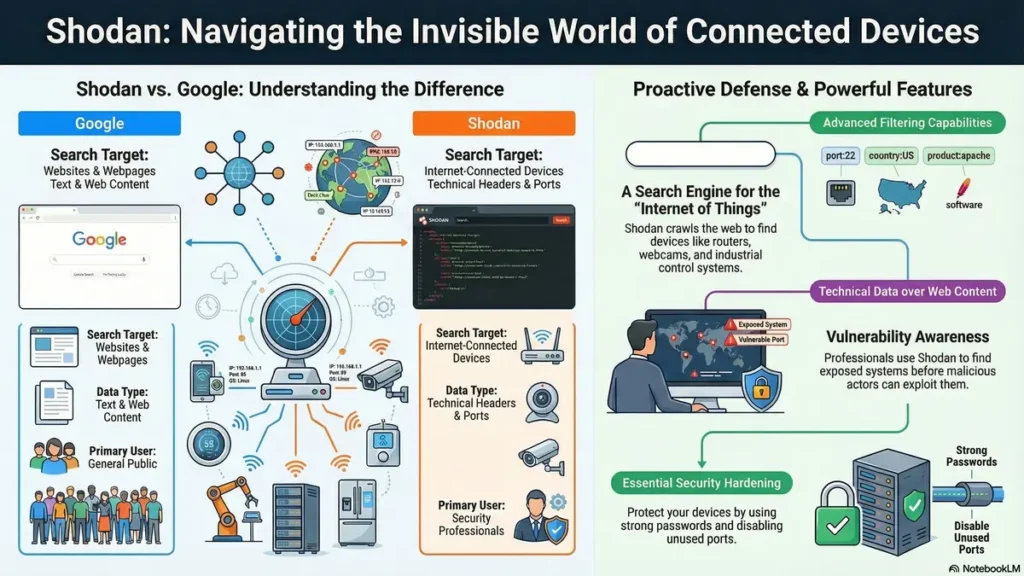
Unlike Google, which indexes web pages, It crawls the internet and gathers information on devices connected to the internet. The devices connected to the internet include:
- Web servers
- Security cameras
- Industrial control systems
- Smart home devices
- Databases
- Routers and switches
It gathers information from the devices connected to the internet, including the IP address, location, and ports.
How Shodan Works
However, It is different from other normal search engines.
1. Internet Scanning
It scans the internet using automated robots. It sends requests to different ports.
2. Data Collection
When a device sends a response to the request, It collects data such as:
IP address
Operating system
Open ports
Services running
3. Indexing
The data collected is stored in a database that users can use to perform a search using filters and keywords.
4. Search Results
When you perform a search using this tool, you get detailed information about the devices rather than web pages.
Key Features
1. Device Search
You can search for certain devices using the following filters:
Country
City
Port
Organization
Example:apache country:IN
2. Vulnerability Detection
It can be useful for security professionals to detect devices with known vulnerabilities.
3. Real-Time Monitoring
It allows users to monitor the network and send alerts if certain devices are added.
4. Shodan Maps
It also allows users to visualize the locations of the devices around the world.
5. Filters and Advanced Queries
It allows users to perform advanced queries by using the following filters:
port:22(SSH devices)os:windowsproduct:nginx
🔹 Why is Shodan Important?
It is of critical importance to cybersecurity.
1. Security Awareness
It helps organizations become aware of how vulnerable they are on the internet.
2. Vulnerability Assessment
Security experts use this tool to locate vulnerable systems before hackers do.
3. Research and Analysis
Researchers use this tool to analyze internet trends and device usage.
4. Ethical Hacking
Ethical hackers use this tool to test systems and make them more secure.
🔹 Uses
This tool is used for several things in the real world.
1. Finding Exposed Devices
It can find exposed devices.
2. Network Security Audits
Companies use it for auditing their networks.
3. IoT Security
It is also used for IoT security, especially because of the rise of IoT.
4. Digital Footprint Analysis
It also helps you analyze how much of your digital footprint is exposed.
🔹 Is this tool Legal?
The answer to this question is yes; It is completely legal.
But how you use it is what makes a big difference.
Legal Use:
Research
Learning cybersecurity
Security testing with permission
Illegal Use:
Unauthorized access to systems
Taking advantage of vulnerabilities
Hacking of devices
🔹 How to Use
If you are a beginner, follow these steps:
Step 1: Create an Account
Go to the website and sign up for a free account.
Step 2: Start Searching
Use simple search queries like:
webcam
Step 3: Use Filters
Try advanced search queries like:
webcam country:IN
Step 4: Explore Results
Click on the search results to get details like:
IP address
Open ports
Locations
Step 5: Learn More
Practice your search filters and learn how devices work.
🔹 Advantages
Highly effective search tool
Helps to improve cybersecurity
Ideal for beginners, as it is easy to use
Provides real-time data
Ideal for ethical hacking
🔹 Disadvantages
May be misused by hackers
Some of its features are only accessible with a paid account
There are risks of exposure of sensitive data
It requires knowledge to fully comprehend
Shodan vs Google
| Feature | Shodan | |
|---|---|---|
| Searches | Websites | Devices |
| Data Type | Web content | Technical data |
| Users | General public | Security professionals |
| Purpose | Information search | Security & analysis |
Tips to Stay Safe
To protect your devices:
Use strong passwords
Disable unused ports
Update software regularly
Use firewalls
Avoid exposing devices directly to the internet
Conclusion
It is a powerful tool, and it opens a new perspective for users about the internet. It is not a tool for searching websites, but it is a tool for exploring the invisible world of connected devices.
It is a great tool for beginners who want to learn about cybersecurity and how the internet works behind the scenes. It is also an important tool for professionals who want to improve cybersecurity.
But, as we all know, “with great power comes great responsibility.” So, it is very important to use Shodan for learning and protecting, not for exploitation.
If you are interested in ethical hacking, cybersecurity, or networking, it is a must-learn tool for you.
🔹 Frequently Asked Questions (FAQs)
1. What is the main use of the search engine named Shodan?
The main use of this search engine is to find internet-connected devices such as servers, webcams, routers, etc. It helps to analyze the security risks and systems available on the internet.
2. Is Shodan different from Google?
Yes, It is different from Google. Google is used to search websites and web pages, whereas It is used to search devices.
3. Explain how Shodan works.
It works by scanning the internet and gathering information from various devices. It stores this information in a database and allows users to search for this information using filters.
4. Is using Shodan legal?
Yes, using this tool is legal. However, hacking and using these systems without permission is illegal.
5. Is Shodan suitable for beginners to use?
Yes, beginners can easily use this tool. It is very simple to use and allows beginners to learn how to use filters.
6. What types of devices does Shodan find on the internet?
This tool finds IoT devices, CCTV cameras, servers, routers, smart home devices, etc.
7. What is meant by filters on Shodan?
Filters on this tool mean advanced search options available on the search engine.
8. How to search in Shodan?
You can search by giving certain keywords and filters, for example, “apache country:IN port:80.”
9. Is Shodan free or paid?
It has both free and paid versions, where the free version has limited features, and the paid version has advanced features.
10. Why is Shodan known as Google for hackers?
It is known as Google for hackers because it helps to find vulnerable devices.
11. Can Shodan detect vulnerabilities?
Yes, It can detect devices that have certain vulnerabilities.
12. How does Shodan help in cybersecurity?
It helps security professionals to find vulnerable points in the systems, thereby providing better protection against cyber attacks.
13. What is IoT in the context of Shodan?
In the context of Shodan, IoT means smart devices connected to the internet.
14. Can Shodan display my device?
Yes, if the device is connected to the internet and not well configured, it can be displayed on Shodan.
15. How to protect devices from Shodan?
Devices can be protected using firewalls, password protection, closing ports, and updating the software.
16. What is Shodan CLI?
CLI is a command-line interface that enables users to access Shodan using the command line.
17. Can Shodan be used for ethical hacking?
Yes, It is used for ethical hacking.
18. What is Shodan API?
API enables developers to access Shodan in their applications.
19. What are open ports in Shodan?
Open ports refer to the channels that enable data transfer. It enables users to access the open ports on a device.
20. Why is Shodan important for network security?
It enables users to locate exposed systems; therefore, security risks can be addressed before they are exploited.It is one of the modules available with recon-ng marketplace.
20. What is an IoT search engine used for?
The use of an IoT search engine is for finding internet-connected devices, such as cameras, routers, and smart systems, using publicly accessible information.
21. How does a device search engine help in cybersecurity?
A device search engine helps in cybersecurity because it helps identify exposed systems, which can be fixed before they are exploited by hackers.
22. What is internet-wide scanning?
Internet-wide scanning is a technique of scanning a wide range of IP addresses to gather information about internet-connected devices.
23. What are open ports in network scanning tools?
Open ports are endpoints for communication, which can be detected using network scanning tools.
24. How can a security scanning tool detect exposed services?
A security scanning tool can detect exposed services using responses from exposed devices, running software, and open ports.
25. What is banner grabbing in information gathering?
Banner grabbing is a technique of gathering information from a service or server.
26. Why is network visibility important for organizations?
Network visibility is important for an organization as it helps the organization understand the devices and services it has exposed to the internet.
27. What is the role of reconnaissance tools in ethical hacking?
Reconnaissance tools are used to gather information on the targeted system for security purposes.
28. How do cybersecurity tools help in vulnerability assessment?
Cybersecurity tools help assess the system for security risks by analyzing the system for weaknesses.
29. What is meant by exposed devices on the internet?
Exposed devices refer to the devices an organization has exposed to the internet without security.
30. How can organizations reduce their attack surface?
Organizations can reduce their attack surface by reducing the devices exposed to the internet.
31. What is a network intelligence tool?
A network intelligence tool is used to collect and analyze data about internet-connected devices, helping in security monitoring and threat detection.
32. How do internet scanning tools collect device data?
Internet scanning tools collect device data by sending requests to IP addresses and analyzing the responses from open ports and services.
33. What is meant by exposed services in cybersecurity?
Exposed services are applications or ports that are accessible over the internet and may pose a security risk if not properly secured.
34. How does an IP scanning tool help in information gathering?
An IP scanning tool helps identify active devices, open ports, and running services, which is useful during the reconnaissance phase.
35. What is the importance of port scanning in cybersecurity?
Port scanning helps detect open ports and services on a device, allowing security professionals to identify potential vulnerabilities.
🌟 Stay Connected with Coding Journey 🌟
Friends,
I’ve started Coding Journey to share tech knowledge, cybersecurity awareness, digital marketing tips, and practical tutorials to help everyone grow safely in the digital world.
If you find value in learning about:
✅ Linux & Cybersecurity
✅ Digital Marketing & SEO
✅ Online safety & scam awareness
✅ Practical tech guides
I’d really appreciate your support and follow 🙏
🔗 Official Website & Blog
🌐 https://codingjourney.co.in
📝 https://codingjourney1983.blogspot.com
🔗 Follow on Social Media
🔵 Facebook: https://www.facebook.com/people/Coding-journey/61585197473575/
💼 LinkedIn: https://www.linkedin.com/in/sunil-kumar-tiwari-07b8b466
🐦 X (Twitter): https://x.com/suniltiwari4509
📸 Instagram: https://www.instagram.com/coding9529/
📌 Pinterest: https://in.pinterest.com/codingjourney1983/
❓ Quora: https://www.quora.com/profile/Sunil-4966
✍️ Medium: https://medium.com/@codingjourney1983
Your one follow, like, or share really motivates me to create more helpful content 💙
Thank you for supporting Coding Journey 🙌
Let’s learn, grow, and stay secure together.
Related Posts
 IoT Device Security Standards: 10 Hidden Risks & Fixes
IoT device security standards may be the furthest thing from your thoughts when you are…
 Censys: The Ultimate Internet Intelligence Tool
In today’s world of cybersecurity and ethical hacking, one of the most critical steps is…
 5 Powerful Benefits of TLS Security to Protect Your Data
Table of Contents TLS security and Why Should You Care? The TLS Handshake: How Secure…
 server security audit: Windows, Linux & Virtual Servers
Servers are the brain and heart of any organization. They store sensitive customer data, business…

