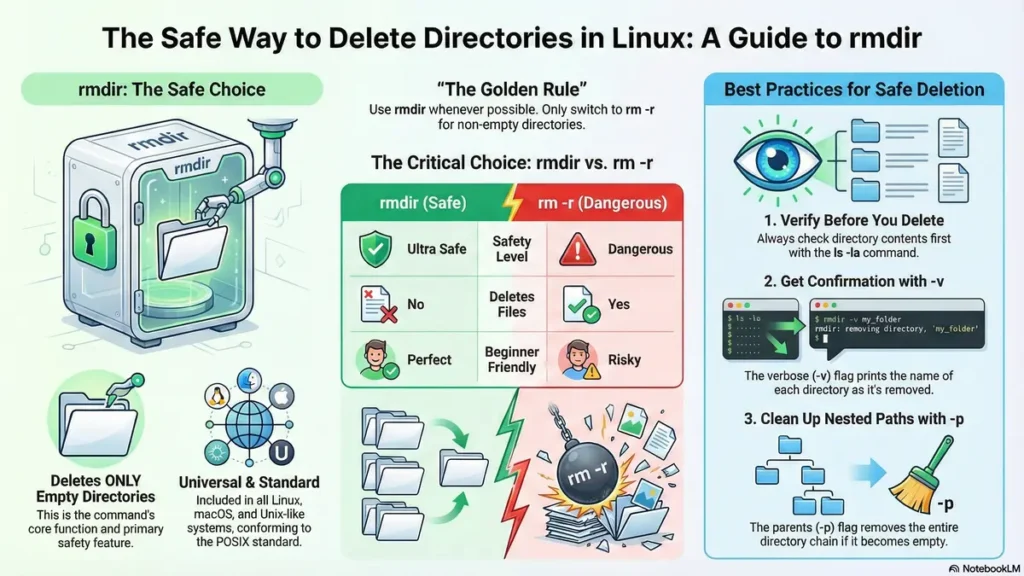
rmdir command in Linux is the safest method to remove an empty directory. This command won’t allow users to delete a directory that contains files but will give either new or experienced users the ability to safely delete empty directories.
The rmdir command comes as standard equipment with every Linux System, as it conforms to POSIX (Portable Operating System Interface). As a result, users of Ubuntu, Fedora, Mac OS X, etc., can all use the `rmdir` command in the same manner.
📋 Table of Contents
- What is rmdir Command in linux?
- Syntax & Options
- 15 rmdir command Basic Examples
- Advanced Techniques
- rmdir vs rm -r Complete Comparison
- 12 rmdir command Common Errors & Fixes
- Best rmdir Command Practices 2026
- Bash Scripts
- Uses Across Linux Distros
- Top 7 rmdir Command Alternatives
- Performance Optimization
- Security Best Practices
- rmdir Command FAQs Answered
What is rmdir Command in linux?
Using directories is only possible through the use of Directory Removal Commands. The purpose is to delete an empty directory from the filesystem. While this command is not as powerful or as harmful as the rm -r command, there are built-in safeguards with this command preventing the user from unintentionally deleting their files.
Key Features:
- Only delete an empty directory
- Included in all linux distributions
- A POSIX standard command, so it functions the same on all Unix-like operating systems
- Lightning-fast deletion of an empty directory
- Very helpful with automation and cleaning scripts
- No way to mistakenly delete a file
This command is ideal for developers who want to clean out temporary directories on their computers, administrators of system and/or networked servers who need to keep the server they’ve purchased or managed, and those beginning to learn to manage files in Linux.
Syntax & Options
rmdir [OPTIONS] DIRECTORY...Main Options Table
| Option | Description | Example | Use Case |
|---|---|---|---|
| -p, –parents | Remove parent directories if they become empty | rmdir -p dir1/dir2/dir3 | Nested cleanup |
| -v, –verbose | Display each directory as it’s removed | rmdir -v temp1 temp2 | Script logging |
| –ignore-fail-on-non-empty | Continue even if directories aren’t empty | rmdir –ignore temp* | Bulk operations |
| –help | Show help information | rmdir –help | Quick reference |
| –version | Show rmdir version info | rmdir –version | Version checking |
15 rmdir Command Basic Examples
- Single Directory:
mkdir testdir && rmdir testdir - Multiple Directories:
rmdir temp1 temp2 logs - Verbose Mode:
rmdir -v backups archives old - Parent Chain:
rmdir -p folder1/folder2/folder3 - Wildcard Pattern:
rmdir temp_* - Sudo Access:
sudo rmdir /var/tmp/testdir - Single Character:
rmdir dir?(dir1, dir2, etc.) - Safety Check:
ls -la dir && rmdir dir - Absolute Path:
rmdir /home/user/tmp/test - Tab Completion:
rmdir te + TAB - Current Directory:
rmdir .(if empty) - Combined Flags:
rmdir -vp dir1 dir2 - Quote Wildcards:
rmdir "dir*" - Temp Cleanup:
rmdir /tmp/mydir - Numbers Pattern:
rmdir dir[0-9]*
Advanced rmdir Command Techniques
Nested Directory Cleanup
# Chain deletion - removes all if empty top-down
rmdir -p project/logs/2026/01 project/logs/2026 project/logs
Bulk Empty Directory Removal
# Find and delete ALL empty directories


find . -type d -empty -print -exec rmdir {} +

# Simple pattern-based

rmdir -v */
Safe Bulk Cleanup Script
#!/bin/bash


# Only deletes confirmed empty directories

for dir in temp* log* backup*; do
[[ -d "(ls -A "$dir" 2>/dev/null)" ]] &&

rmdir -v "$dir" || echo "⏭️  Skipping: $dir"
done
rmdir command vs rm -r Complete Comparison
| Feature | rmdir | rm -r | Winner |
|---|---|---|---|
| Empty dirs only | ✅ YES | ❌ No | rmdir |
| Deletes files | ❌ No | ✅ Yes | rm -r |
| Recursive deletion | ⚠️ Parents only | ✅ Full recursion | rm -r |
| Safety level | 🟢 Ultra Safe | 🔴 Dangerous | rmdir |
| Beginner friendly | ✅ Perfect | ⚠️ Risky | rmdir |
| Script safe | ✅ Always | ⚠️ Careful | rmdir |
Rule #1: Use rmdir command whenever possible. Switch to rm -r only when you need to delete non-empty directories.
12 Common rmdir Errors & Fixes
| Error Message | Cause | 💡 Solution |
|---|---|---|
| Directory not empty | Contains files/subdirs | rm * && rmdir . |
| No such file or directory | Wrong path/spelling | pwd && ls -la |
| Permission denied | No write permissions | sudo rmdir dir |
| Is a directory | Used rm instead of rmdir | Use rmdir not rm |
| Wildcard expansion issues | Unquoted patterns | rmdir “dir*” |
Best Practices 2026
- ALWAYS verify:
ls -la directory_name - Use -v flag for confirmation:
rmdir -v dir - Test in safe location:
/tmpdirectory - Quote wildcards:
rmdir "temp*" - Combine flags:
rmdir -vp dir1 dir2 - Avoid root: Never
sudo rmdir /* - Log everything:
rmdir -v > cleanup.log - Pair with creation:
mkdir -p && rmdir -p - Always double-check the path before running rmdir
- Use tab completion to avoid typos in directory names
- Prefer rmdir over rm -r when the directory is empty
- Never run rmdir on system directories like /bin, /sbin, /usr
- Use absolute paths when scripting to avoid confusion
- Check directory ownership and permissions with
ls -ld dir - Use
echobefore rmdir in scripts to preview what will be deleted - Always backup important data before bulk directory cleanup
- Use
find . -type d -emptyto safely list empty directories first - Run rmdir in a test environment before using it in production
- Use
--ignore-fail-on-non-emptyonly when intentionally skipping non-empty dirs - Review and test any rmdir-based script in a non-critical directory first
Bash Scripts
#!/bin/bash

# ========================================

# Ultimate Safe Directory Cleanup Script

# Author: Linux Admin | 2026

# ========================================

declare -a CLEANUP_PATTERNS=(
"temp_*"
"logs_*"
"backup_*"
"cache_*"
"*.tmp"
)

echo "🧹 Starting safe directory cleanup..."
SUCCESS_COUNT=0
SKIP_COUNT=0

for pattern in "${CLEANUP_PATTERNS[@]}"; do
echo "🔍 Checking pattern: $pattern"


for dir in $pattern; do
    if [[ -d "$dir" ]]; then
        if [[ -z "$(ls -A "$dir" 2>/dev/null)" ]]; then
            rmdir -v "$dir" && ((SUCCESS_COUNT++)) || ((SKIP_COUNT++))
        else
            echo "⏭️  Skipping non-empty: $dir"
            ((SKIP_COUNT++))
        fi
    fi
done


done

echo "✅ Cleanup complete: $SUCCESS_COUNT deleted, $SKIP_COUNT skipped"
rmdir Across Linux Distros
| Distribution | rmdir Version | Special Notes |
|---|---|---|
| Ubuntu 24.04 LTS | GNU coreutils 9.4 | Standard feature complete |
| Fedora 41 | GNU coreutils 9.5 | Latest enhancements |
| Arch Linux | GNU coreutils 9.5+ | Rolling release |
| Alpine Linux | BusyBox rmdir | Minimal – basic flags only |
| macOS Sonoma | BSD rmdir | Compatible syntax |
Top 7 rmdir Alternatives
- rm -d: Single empty directory
- find -type d -empty -delete: Powerful bulk cleanup
- GUI Managers: Nautilus/Dolphin right-click
- Python:
os.rmdir(path) - Zsh:
take -d dir(creates then removes) - Aliases: Custom safe-rmdir wrapper
- Docker:
docker run --rm -v .:/work busybox rmdir /work/dir
Performance Optimization
- Wildcards > Loops:
rmdir temp*> for loop - Batch Multiple:
rmdir dir1 dir2 dir3 - -p Flag: Chain deletion in single command
- Empty dir deletion = microseconds
- Scale to thousands safely with proper patterns
Security Best Practices
- Quote ALL wildcards:
rmdir "dir*" - Never:
sudo rmdir /*(system destruction) - Audit trail: Always use -v flag
- No dangerous aliases in .bashrc
- Test scripts in /tmp first
- Containerize risky bulk operations
- Always verify directory contents with
ls -la dirbefore deletion - Use absolute paths in scripts to avoid accidental deletion in wrong locations
- Prefer
rmdiroverrm -rwhenever the directory is empty - Never run rmdir on critical system directories like /etc, /var, /boot
- Use
find . -type d -emptyto safely list empty directories before removal - Always check ownership and permissions with
ls -ld dirbefore using sudo - Use tab completion to avoid typos in directory names
- Log all rmdir operations:
rmdir -v dir >> cleanup.log 2>&1 - Review and test any rmdir-based script in a non-critical directory first
- Use
--ignore-fail-on-non-emptyonly when intentionally skipping non-empty dirs - Always backup important data before bulk directory cleanup
- Run rmdir commands in a test environment before using them in production
- Use
echobefore rmdir in scripts to preview what will be deleted - Combine flags like
-vpfor verbose, parent-chain deletion
FAQs Answered
- What does rmdir do in Linux?
This command safely deletes empty directories only. Refuses to touch folders with files inside, making it perfect for beginners avoiding data loss disasters.
- Basic rmdir command syntax?
rmdir directory_name for single folders. rmdir dir1 dir2 dir3 for multiple empty directories. All must be completely empty.
- Can rmdir delete non-empty directories?
No. Use rm -r directory for non-empty folders. rmdir’s safety feature prevents accidental file deletion – switch commands carefully.
- What does rmdir -p option do?
-p removes parent directories if they become empty after child deletion. Example: rmdir -p dir1/dir2/dir3 chain cleans entire path.
- rmdir vs rm -r difference?
rmdir = empty dirs only (safe). rm -r = everything recursively (dangerous). Use rmdir 90% of time, rm -r only when files must be deleted.
- Fix “Permission denied” error?
Use sudo rmdir directory or fix permissions: chmod 755 directory && rmdir directory. Check ownership with ls -la.
- Delete multiple directories with rmdir?
rmdir temp1 temp2 logs backups – space separated. All directories must be empty or command fails completely.
- Fix “Directory not empty” error?
Enter directory, remove contents: cd dir && rm * && cd .. && rmdir dir. Always verify emptiness with ls -la first.
- Enable verbose rmdir output?
rmdir -v temp1 temp2 shows each deleted directory. Essential for scripts and audit trails: “removed directory ‘temp1′”.
- Wildcards with rmdir safe?
Yes! rmdir temp_* but quote for safety: rmdir “temp_”. Prevents shell expansion surprises with spaces/special chars.
- rmdir work on macOS?
Yes, identical syntax on macOS (BSD rmdir). Same -p -v flags work perfectly across Linux/macOS/Unix systems.
- Safe rmdir bash script example?
for dir in temp; do [[ -z “$(ls -A “$dir”)” ]] && rmdir “$dir”; done. Checks emptiness before deletion every time.
- Undo rmdir deletion possible?
No undo. Recreate manually: mkdir directory_name. Prevention better than cure – always ls -la before rmdir.
- Safe to rmdir root directories?
AVOID rmdir / or rmdir /* – system destruction! Test everything in /tmp first always.
- rmdir case sensitive?
Yes, Linux filesystem case sensitive. rmdir Dir1 ≠ rmdir dir1. Use ls to verify exact casing.
- Bulk empty directory cleanup?
find . -type d -empty -exec rmdir {} + or simple: rmdir -p /. Perfect for project cleanup.
- Skip non-empty automatically?
rmdir –ignore-fail-on-non-empty temp. Continues processing even when some directories contain files.
- Check rmdir version installed?
rmdir –version shows GNU coreutils version. Important for feature compatibility across systems.
- Windows rmdir equivalent?
Use WSL or Git Bash for Linux rmdir. Windows native: rmdir /s folder (different syntax/flags).
- Safest rmdir workflow beginners?
1️⃣ ls -la directory 2️⃣ rmdir -v directory 3️⃣ ls verify. Never skip step 1!
Linkedln Connect on LinkedIn