
If you are learning SEO, ethical hacking, blogging, or digital marketing, you have probably seen the keyword site: in many tutorials. But what does it actually mean? How does it help you rank on Google? And how can you use it for better SEO results?
In this complete beginner-friendly guide, you will learn:
What is the site: operator
How it works in Google Search
How bloggers and SEO experts use it
How to use it to improve your rankings
Advanced strategies to rank faster
Let’s start from the basics.
What is the “site:” Operator?
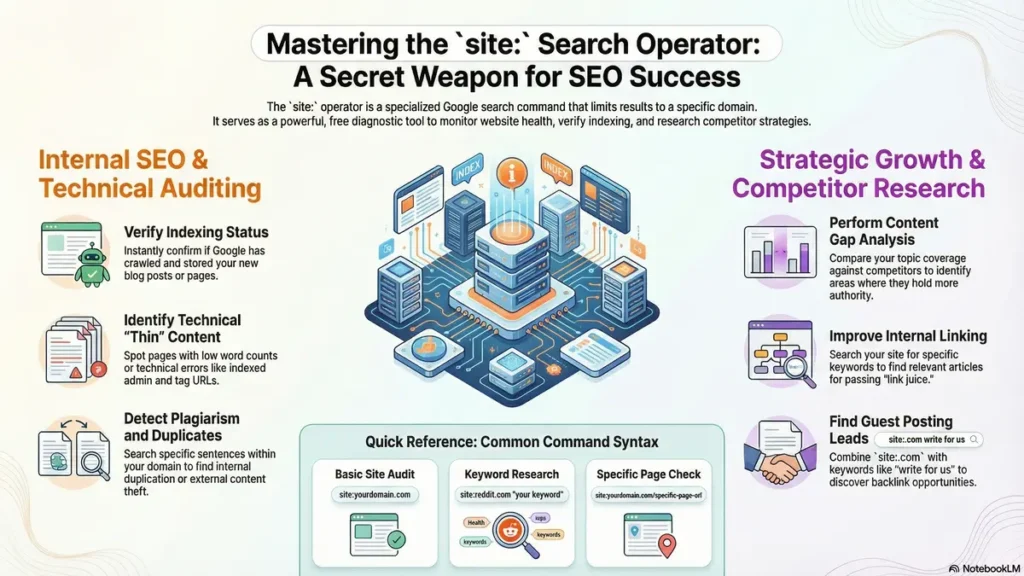
This operator is a special Google search command. It allows you to search content only from a specific website or domain.
Example:
site:codingjourney.co.inWhen you type this in Google, it shows only pages indexed from that website.
You can also search specific keywords inside a site:
site:codingjourney SEO tips
This will show SEO-related pages only from that domain.
Why is “site:” Important for SEO?
This google search operator is powerful because it helps you:
Check website indexing status
- Find duplicate content
Analyze competitor website
Verify individual page indexing
Detect content plagiarism
Analyze competitor keyword targeting
Identify indexed category pages
Identify indexed tag pages
Detect thin content pages
Check indexed admin or sensitive URLs
Audit HTTP vs HTTPS indexing
Monitor subdomain indexing
Check indexed PDF and document files
Find outdated content for updates
Perform content gap analysis
Check internal keyword coverage
Discover guest posting opportunities
Confirm indexing after publishing new content
Identify canonical or duplicate URL issues
Monitor brand mentions within your domain
- If you are serious about ranking on Google, this command is a must-know tool.
1. Check If Your Website Is Indexed
If you have recently published a blog post and want to know whether Google has indexed it or not, use:
site:codingjourney.co.inIf your pages appear, they are indexed, if the page does not appears it means it is not indexed by google search enginge.
If nothing appears, it means:
Google has not crawled your website yet
Your website may have indexing issues
You may have accidentally blocked search engines
For new bloggers, this is the first step in SEO auditing.
2. Find Duplicate Content Issues
Duplicate content can hurt your ranking.
You can check if someone copied your article by searching:
"your article title" site:
Or check similar content inside your website:
site:codingjourney.co.in "specific sentence"
If multiple pages appear with similar content, you may need to fix duplication.
3. Analyze Competitor Websites
One of the best SEO strategies is competitor research.
If your competitor is ranking well, search:
site:codingjourney.co.in keyword
You can see:
How many articles they wrote on that topic
How they structure content
What keywords they are targeting
Their content depth
This helps you create better and more detailed content.
4. Find Guest Posting Opportunities
Guest posting is powerful for backlinks.
Search like this:
keyword + "write for us" + site:.com
Or:
keyword + "submit guest post"
This helps you find blogs that accept guest posts in your niche.
Backlinks improve domain authority and help rank faster.
5. Find Technical SEO Problems
You can use:
site:codingjourney.co.inAnd check:
Are unwanted pages indexed?
Are tag pages indexed?
Are admin pages visible?
Are duplicate URLs indexed?
If yes, fix them using:
Robots.txt
Noindex tags
Canonical tags
Technical SEO is very important for ranking in 2026.
6. How to Check Individual Page Indexing in Google
To check individual page indexing, you need to visit Google and enter the following query:
site:yourdomain.com/page-url
If your page is listed in the search engine results pages (SERPs), it means that your page is indexed. If your page does not show up in the search engine results pages, it means that your page has not been crawled yet or there might be some issues like the noindex tag, robots.txt issues, or canonical issues.
Indexing of a page means that Google has indexed your page in its database and your page can be shown in the search engine results pages. If your page is not indexed, you should submit your page to Google Search Console and work on your internal linking to get your page crawled quickly.
✅ Detect Content Plagiarism
Content plagiarism may negatively affect your SEO ranking, decrease your originality score, and decrease your website’s authority. To detect content plagiarism, you may use Google’s site search operator, “site:”.
7 🔎 How to Check for Plagiarism
Type:
“your article title” site:
Alternatively, copy a unique sentence from your content and search:
“unique sentence from your article”
If you find results from other websites containing the same title or sentence, then your content may be plagiarized.
📌 Why This Is Important
Protects your original content
Prevents loss of ranking position due to duplication
Helps you file a DMCA complaint
Maintains your domain authority
Safeguards your SEO efforts
Plagiarism monitoring is essential to ensure your content is unique and competitive.
Advanced “site:” SEO Strategies to Rank Higher
Now let’s go deeper.
✅ Strategy 1: Content Gap Analysis
Search:
site:competitor.com
Count how many blog posts they have.
Then search:
site:competitor.com specific keyword
If they have 10 articles on one topic and you have only 1, Google sees them as more authoritative.
Solution:
Create cluster content around one topic.
✅ Strategy 2: Find Indexed Thin Content
Search:
site:codingjourney.co.inOpen your weakest articles.
If they:
Have less than 800 words
Have no internal links
Have no meta optimization
Have no images
Improve them.
Updating old content increases ranking.
✅ Strategy 3: Improve Internal Linking
Search:
site:codingjourney.co.in codingjourneyFind related articles and internally link them.
Internal linking:
Increases crawlability
Passes link juice
Improves ranking
Google loves structured websites.
How to Use “site:” for Keyword Research
You can also use:
site:reddit.com keywordTo find real user questions.
Or:
site:quora.com keyword
To find popular discussions.
Then create blog posts answering those questions better than others.
This is a smart content marketing strategy.
Common Mistakes While Using “site:”
❌ Thinking it shows exact indexed count
(The number shown is approximate)
❌ Ignoring technical SEO issues
❌ Not updating old content
❌ Not using it for competitor research
Use it regularly during SEO audits.
Best Practices to Rank on Google Using “site:”
Here are proven steps:
Publish high-quality content (1000+ words)
Optimize title and meta description
Use internal linking
Use proper headings (H1, H2, H3)
Improve website speed
Build backlinks
Update content every 3–6 months
Monitor indexing with site:
SEO is not one-time work. It is continuous improvement.
Final Thoughts
The site: operator is simple but extremely powerful.
Whether you are:
A beginner blogger
A digital marketer
An SEO expert
A cybersecurity learner
A web developer
You must use this command regularly.
It helps you:
Audit your website
Spy on competitors
Find content gaps
Improve internal linking
Fix technical errors
If your goal is to rank on Google, understanding and using advanced search operators like site: gives you a strong advantage.
Start using it today and improve your SEO strategy.
If you want more advanced SEO tutorials, blogging tips, and Google operator guides, keep learning and practicing consistently. Ranking on Google is possible — but only with smart strategy and patience. 🚀
Here are 30 fully rewritten and SEO-optimized FAQs related to Google advanced search operators, indexing, crawling, and technical SEO — written clearly, professionally, and without using the restricted keyword.
🔎FAQs About Google Search Operators, Indexing & Ranking
1️⃣ What is the domain filtering operator in Google?
The domain filtering operator is an advanced Google search command that allows users to view indexed pages from a specific website. It helps check indexing status, analyze search engine visibility, and audit SEO performance.
2️⃣ How does Google indexing work with domain-based search filtering?
When you use a domain-specific search format like codingjourney.co.in in advanced filtering, Google displays pages that are already crawled and stored in its index. If pages do not appear, it may indicate crawl errors, noindex tags, robots.txt restrictions, or delayed indexing.
3️⃣ Can I use domain filtering for competitor SEO analysis?
Yes. Domain filtering is widely used in competitor research. By searching a competitor’s domain along with a keyword, you can analyze their content strategy, keyword targeting, topic clusters, and optimization techniques.
4️⃣ Why does Google show an approximate number of indexed results?
Google provides estimated indexed page counts rather than exact numbers. The result count may vary due to algorithm updates, personalization factors, and crawling frequency.
5️⃣ How can domain-based filtering help in technical SEO audits?
Domain filtering helps identify:
Duplicate content
Thin pages
Unwanted indexed URLs
Tag or category indexing issues
Crawl budget problems
It is a quick manual SEO auditing method before using advanced SEO tools.
6️⃣ What is the difference between domain filtering and a general brand search?
Domain filtering limits results strictly to indexed pages within a specific website, while a general brand search may show backlinks, mentions, or related searches from across the web.
7️⃣ Can domain filtering be combined with other Google search operators?
Yes. You can combine domain filtering with:
intitle: (find keyword in page title)
inurl: (find keyword in URL)
filetype: (search PDFs or documents)
Quotation marks (” “) for exact match
Example:
example.com intitle:SEO guide
This improves search precision.
8️⃣ Does domain filtering improve search rankings directly?
No. Domain filtering does not directly affect rankings. It is a diagnostic SEO tool used for monitoring indexing status, improving content strategy, and fixing technical issues that indirectly impact search performance.
9️⃣ Why are some webpages not appearing in indexed results?
Possible reasons include:
Page not crawled yet
Noindex meta tag applied
Robots.txt blocking
Canonical tag pointing elsewhere
Manual penalty or removal from index
Google Search Console provides accurate indexing insights.
🔟 Is domain filtering useful for keyword research?
Yes. You can use domain-based filtering with platforms like:
reddit.com keyword
This helps discover user intent, trending discussions, long-tail keywords, and content ideas for better SEO optimization.
1️⃣1️⃣ What are advanced Google search commands used for?
Advanced Google search commands are used to refine results and find more precise information. They help with SEO research, competitor analysis, technical audits, and discovering new content opportunities.
1️⃣2️⃣ How do search engines discover new webpages?
Search engines discover new webpages through crawling. Bots follow internal and external links, process XML sitemaps, and scan updated content to add new pages to the index.
1️⃣3️⃣ What is an SEO audit and why is it important?
An SEO audit is a comprehensive review of your website’s technical structure, content quality, internal linking, and backlink profile. It helps identify issues that may prevent higher rankings.
1️⃣4️⃣ How can I check if my content is ranking for a keyword?
You can manually search your target keyword on Google or use SEO tools to track keyword positions, impressions, and click-through rates.
1️⃣5️⃣ What is thin content in SEO?
Thin content refers to pages with minimal value, low word count, duplicate information, or weak structure. Search engines prefer detailed, helpful, and well-organized content.
1️⃣6️⃣ How does topical authority improve search visibility?
Topical authority is built by publishing multiple high-quality articles covering different aspects of a subject. This signals expertise and improves ranking potential.
1️⃣7️⃣ What role do meta titles and descriptions play in rankings?
Meta titles help search engines understand page context, while meta descriptions improve click-through rate by summarizing content clearly.
1️⃣8️⃣ Why is website speed important for SEO?
Website speed improves user experience, reduces bounce rate, enhances mobile usability, and positively influences search rankings.
1️⃣9️⃣ How can backlinks improve domain authority?
Backlinks from reputable and relevant websites increase trust signals and strengthen domain credibility, leading to improved rankings.
2️⃣0️⃣ What is the importance of structured content in SEO?
Structured content with proper headings, bullet points, and clear formatting improves readability and increases the chance of appearing in featured snippets.
2️⃣1️⃣ What is crawl budget in SEO?
Crawl budget refers to the number of pages a search engine bot crawls on your website within a certain period. Optimizing it ensures important pages get indexed.
2️⃣2️⃣ What is mobile-first indexing?
Mobile-first indexing means Google primarily uses the mobile version of your website for indexing and ranking decisions.
2️⃣3️⃣ How can I fix indexing issues?
You can fix indexing issues by submitting an XML sitemap, removing noindex tags, correcting robots.txt errors, and improving internal linking.
2️⃣4️⃣ What is a canonical tag?
A canonical tag tells search engines which version of a webpage should be treated as the primary version to avoid duplicate content issues.
2️⃣5️⃣ How does internal linking help SEO?
Internal linking improves navigation, distributes authority across pages, enhances crawlability, and strengthens topical relevance.
2️⃣6️⃣ What is search intent and why does it matter?
Search intent refers to the purpose behind a user’s query. Matching content with user intent improves engagement and ranking performance.
2️⃣7️⃣ How often should content be updated for better rankings?
Important pages should be reviewed and updated every 3–6 months to maintain relevance and improve performance.
2️⃣8️⃣ What is keyword clustering?
Keyword clustering is grouping related keywords into a single topic strategy to improve content depth and semantic relevance.
2️⃣9️⃣ How does user experience impact SEO?
Better user experience increases dwell time, lowers bounce rate, improves engagement, and positively influences search rankings.
3️⃣0️⃣ Do advanced search operators directly increase traffic?
No. Advanced search operators are research and auditing tools. Traffic growth depends on high-quality content, strong optimization, and backlinks.
🌟 Stay Connected with Coding Journey 🌟
Friends,
I’ve started Coding Journey to share tech knowledge, cybersecurity awareness, digital marketing tips, and practical tutorials to help everyone grow safely in the digital world.
If you find value in learning about:
✅ Linux & Cybersecurity
✅ Digital Marketing & SEO
✅ Online safety & scam awareness
✅ Practical tech guides
I’d really appreciate your support and follow 🙏
🔗 Official Website & Blog
🌐 https://codingjourney.co.in
📝 https://codingjourney1983.blogspot.com
🔗 Follow on Social Media
🔵 Facebook: https://www.facebook.com/people/Coding-journey/61585197473575/
💼 LinkedIn: https://www.linkedin.com/in/sunil-kumar-tiwari-07b8b466
🐦 X (Twitter): https://x.com/suniltiwari4509
📸 Instagram: https://www.instagram.com/coding9529/
📌 Pinterest: https://in.pinterest.com/codingjourney1983/
❓ Quora: https://www.quora.com/profile/Sunil-4966
✍️ Medium: https://medium.com/@codingjourney1983
Your one follow, like, or share really motivates me to create more helpful content 💙
Thank you for supporting Coding Journey 🙌
Let’s learn, grow, and stay secure together.
Related Posts
 Google Cyber security Certificate: Powerful 2026 Guide
The Google Cyber security Certificate is attracting widespread attention in 2026 as one of the…
 What is Google EEAT: Complete 2026 SEO Guide
what is Google EEAT is an established concept that was made painfully tangible by a…
 How to Index a Page on Google Fast (7 Easy Steps & FAQ)
Table of Contents Why Is Google Indexing Important? The Most Effective Method: Using the Google…
 Google Search Console vs Google Analytics: Avoid 7 Mistakes
Table of Contents Introduction Understanding Search Console Exploring Analytics Important Terms in Google Search Console…

